


How to close status bar of the search bar when inputting?

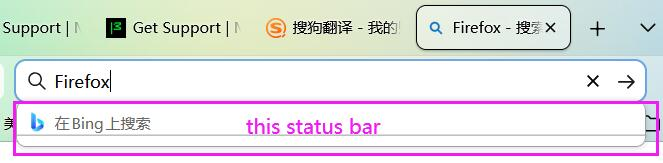
How to close status bar of the search bar when inputting? When I input a search key word, below will show a status(or a remind) bar. This is very annoying, how to turn it off? Thank you!
How to close status bar of the search bar when inputting?
When I input a search key word, below will show a status(or a remind) bar.
This is very annoying, how to turn it off?
Thank you!
Tất cả các câu trả lời (5)
Hello
browser.urlbar.maxRichResults ?
1 - Go to configuration editor https://support.mozilla.org/en-US/kb/about-config-editor-firefox 2 - Enter a search term browser.urlbar.maxRichResults Double-click on the preference, and, enter a new value 0, and, click the Save button to save the change.
Ok, sorry, apparently, you use the Search bar https://support.mozilla.org/en-US/kb/add-search-bar-firefox-toolbar
Your version 148
For information https://support.mozilla.org/en-US/questions/1573029

