


Windows 10 reached EOS (end of support) on October 14, 2025. If you are on Windows 10, see this article.

Tìm kiếm hỗ trợ

Tránh các lừa đảo về hỗ trợ. Chúng tôi sẽ không bao giờ yêu cầu bạn gọi hoặc nhắn tin đến số điện thoại hoặc chia sẻ thông tin cá nhân. Vui lòng báo cáo hoạt động đáng ngờ bằng cách sử dụng tùy chọn "Báo cáo lạm dụng".

Tìm hiểu thêm
Đã giải quyết

UNABLE to access the Firefox web browser

Hettie Jacobs đã trả lời
Hettie Jacobs

After the latest version was updated, Version 149.00.7, on my laptop, on 27 March 2026, the browser closed midway while I was working, and now I can no longer access Firefox.

When I click on the Icon to access I keep getting the following error message as per the attachment:

I have uninstalled Firefox and re-installed it THREE TIMES already', but I still get the same error as before, as per the screen print provided.

I have even tried to install Firefox with custom settings, but then in order to proceed with the installation the ONLY button to proceed was the "UPGRADE" option.

I am at my wits end because this is totally unacceptable and the updated version obviously DOES NOT WORK!!!

Your urgent attention and prompt action in sorting this out will be appreciated, thanks.

Hettie
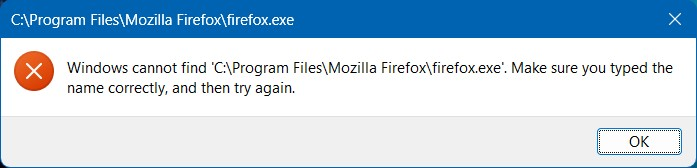
After the latest version was updated, Version 149.00.7, on my laptop, on 27 March 2026, the browser closed midway while I was working, and now I can no longer access Firefox. When I click on the Icon to access I keep getting the following error message as per the attachment: I have ''uninstalled Firefox and re-installed it THREE TIMES already''', but I still get the same error as before, as per the screen print provided. I have even tried to install Firefox with custom settings, but then in order to proceed with the installation the ONLY button to proceed was the "UPGRADE" option. I am at my wits end because this is totally unacceptable and the updated version obviously DOES NOT WORK!!! Your urgent attention and prompt action in sorting this out will be appreciated, thanks. Hettie
Đính kèm ảnh chụp màn hình

Tất cả các câu trả lời (3)

interesting...

What happens when go to that path in the error message and run firefox.exe?

Another test would be to try another version of Firefox (Beta,Dev,or Nightly)and see if you have the same issue. Make sure to install in a different path from your current install. https://www.mozilla.org/en-US/firefox/channel/desktop/

Giải pháp được chọn

If you're done, mark this a resolved and have a nice day.

Still experience issues and I will try to uninstall same.

This can be resolved, thanks

Đặt một câu hỏi

Bạn phải đăng nhập vào tài khoản của bạn để trả lời bài viết. Vui lòng bắt đầu một câu hỏi mới, nếu bạn chưa có tài khoản.