


Windows 10 reached EOS (end of support) on October 14, 2025. If you are on Windows 10, see this article.

Tìm kiếm hỗ trợ

Tránh các lừa đảo về hỗ trợ. Chúng tôi sẽ không bao giờ yêu cầu bạn gọi hoặc nhắn tin đến số điện thoại hoặc chia sẻ thông tin cá nhân. Vui lòng báo cáo hoạt động đáng ngờ bằng cách sử dụng tùy chọn "Báo cáo lạm dụng".

Tìm hiểu thêm

right click print

  • 2 trả lời
  • 0 gặp vấn đề này
  • 135 lượt xem
  • Trả lời mới nhất được viết bởi bbezenek

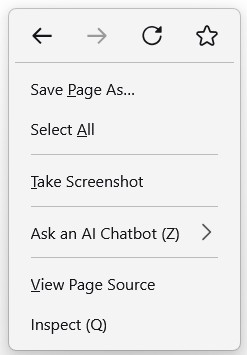
I like Firefox with one exception. The right-click print feature is missing in the drop-down menu. I can print from the Application Menu but the 'print' feature is missing using the mouse right-click menu. The right-click feature does work using other browsers. A picture of my right-click menu using Firefox is attached. THANKS
I like Firefox with one exception. The right-click print feature is missing in the drop-down menu. I can print from the Application Menu but the 'print' feature is missing using the mouse right-click menu. The right-click feature does work using other browsers. A picture of my right-click menu using Firefox is attached. THANKS
Đính kèm ảnh chụp màn hình

Giải pháp được chọn

Hi,

Unfortunately, we don't have an option to add a print menu there.

However, you can simply press the Control (Ctrl) key on your keyboard and the P key at the same time and it will open the print tool.

Alternatively, you can add the print action to the toolbar using the instructions here: http://mzl.la/1BAQIvu

Thanks for getting in touch, Isaac

Đọc câu trả lời này trong ngữ cảnh 👍 0

Tất cả các câu trả lời (2)

Giải pháp được chọn

Hi,

Unfortunately, we don't have an option to add a print menu there.

However, you can simply press the Control (Ctrl) key on your keyboard and the P key at the same time and it will open the print tool.

Alternatively, you can add the print action to the toolbar using the instructions here: http://mzl.la/1BAQIvu

Thanks for getting in touch, Isaac

Thank you - Big help. My solution was to just add the print option to the action toolbar at the top of the page. Works fine and easy to do. Simply:

1. Click on the 'Application Menu with the 3-horizontal bars on the top right of the page to open. 2. Click on 'More Tools' 3. Click on 'Customize Toolbar' 4. From the many action icons to choose from, grab the 'Printer' icon and carry it up to the toolbar and let it go.

WALLA - you have a quick and easy click to print solution.

Đặt một câu hỏi

Bạn phải đăng nhập vào tài khoản của bạn để trả lời bài viết. Vui lòng bắt đầu một câu hỏi mới, nếu bạn chưa có tài khoản.