


Windows 10 reached EOS (end of support) on October 14, 2025. If you are on Windows 10, see this article.

Tìm kiếm hỗ trợ

Tránh các lừa đảo về hỗ trợ. Chúng tôi sẽ không bao giờ yêu cầu bạn gọi hoặc nhắn tin đến số điện thoại hoặc chia sẻ thông tin cá nhân. Vui lòng báo cáo hoạt động đáng ngờ bằng cách sử dụng tùy chọn "Báo cáo lạm dụng".

Tìm hiểu thêm

"Find" highlighted text background is really tough for this color blind person.

  • 1 trả lời
  • 0 gặp vấn đề này
  • 424 lượt xem
  • Trả lời mới nhất được viết bởi TyDraniu
  • Đang mở

Doing a "find" ends up showing a greenish (so I'm told) background with white text. Want to guess which "find" in the attached image is difficult for me to find?

What I would like: Find (focus): yellow text on black background Find All: white text on black background

Yes, of course it would be nice if that would auto switch to black on yellow if the website default is black background.

I can hack userContent.css and get the selection function to work:

/* General highlight (for text selection, etc.) */

selection {
   background: #FFFF00 !important;  /* Yellow background */
   color: #000000 !important;       /* Black text */

}

I can hack userContent.css and get the Find All (sans the focus) to work.

But firefox always provides the focus with white on green. Even if I do something like this:

/* Customize the color of highlighted search text */ input[type="search"]:focus::selection {

   background: #FFFF00 !important;  /* Yellow background */
   color: #000000 !important;       /* Black text */

}

I tried several themes. No change. I tried changing Windows Preferences. No change.

There must be a way to make this "find" feature useful for me.
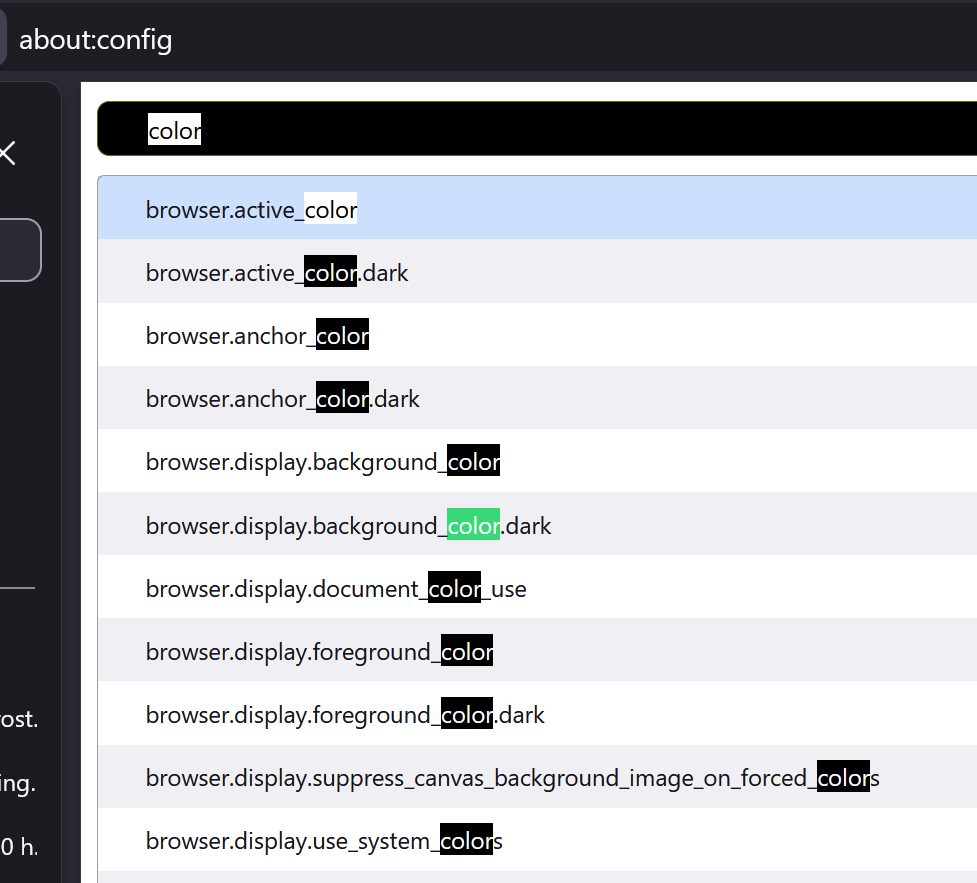
Doing a "find" ends up showing a greenish (so I'm told) background with white text. Want to guess which "find" in the attached image is difficult for me to find? What I would like: Find (focus): yellow text on black background Find All: white text on black background Yes, of course it would be nice if that would auto switch to black on yellow if the website default is black background. I can hack userContent.css and get the selection function to work: /* General highlight (for text selection, etc.) */ ::selection { background: #FFFF00 !important; /* Yellow background */ color: #000000 !important; /* Black text */ } I can hack userContent.css and get the Find All (sans the focus) to work. But firefox always provides the focus with white on green. Even if I do something like this: /* Customize the color of highlighted search text */ input[type="search"]:focus::selection { background: #FFFF00 !important; /* Yellow background */ color: #000000 !important; /* Black text */ } I tried several themes. No change. I tried changing Windows Preferences. No change. There must be a way to make this "find" feature useful for me.
Đính kèm ảnh chụp màn hình

Tất cả các câu trả lời (1)

Go to about:config and type ui.text in the Search preference name textbox. It should give you 5 preferences that you can experiment with.

Được chỉnh sửa bởi TyDraniu vào

Đặt một câu hỏi

Bạn phải đăng nhập vào tài khoản của bạn để trả lời bài viết. Vui lòng bắt đầu một câu hỏi mới, nếu bạn chưa có tài khoản.