


Windows 10 reached EOS (end of support) on October 14, 2025. If you are on Windows 10, see this article.

Tìm kiếm hỗ trợ

Tránh các lừa đảo về hỗ trợ. Chúng tôi sẽ không bao giờ yêu cầu bạn gọi hoặc nhắn tin đến số điện thoại hoặc chia sẻ thông tin cá nhân. Vui lòng báo cáo hoạt động đáng ngờ bằng cách sử dụng tùy chọn "Báo cáo lạm dụng".

Tìm hiểu thêm
Đã giải quyết Đã lưu trữ

When using DuckDuckGo Search, I cannot drag and drop the search URL into my Bookmarks.

Wayne Carpenter đã trả lời
Wayne Carpenter

When using DuckDuckGo Search I cannot drag and drop the search URL into my Bookmarks. I can drag and drop a Google Chrome search URL into my Bookmarks as usual. Also, the correct URL is not shown for the search using DuckDuckGo. See attached screenshot.

Please resolve.
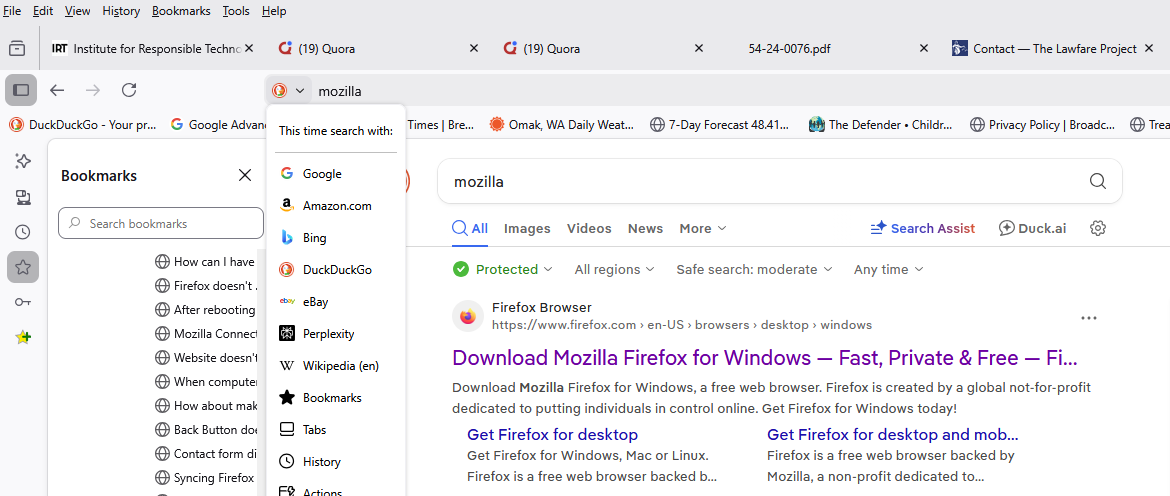
When using DuckDuckGo Search I cannot drag and drop the search URL into my Bookmarks. I can drag and drop a Google Chrome search URL into my Bookmarks as usual. Also, the correct URL is not shown for the search using DuckDuckGo. See attached screenshot. Please resolve.
Đính kèm ảnh chụp màn hình

Tất cả các câu trả lời (4)

Giải pháp được chọn

Try to go to Settings-> Search and turn off Show search terms in the address bar on results pages option.

Although this is not a Search term issue, but what is shown at the beginning of a URL, I tried it and it actually worked! This is strange because without the change, the Google Chrome Search worked as expected.

Được chỉnh sửa bởi Wayne Carpenter vào

Its not necessary to drag the URL. Open the Task Bar right side 3 horizontal lines and open the bookmark tab, to bookmark. This link can then be moved anywhere you want. I use this on my Firefox Ubuntu Linux browser, and am using DuckDuckGo and TOR browsers on my 2 Windows PCs.

The first Reply's suggestion worked until I updated Firefox (149.0) today. Now I cannot drag and drop a URL into a Bookmarks folder from the URL address bar with the "Search and turn off Show search terms in the address bar on results pages option" turned off on most websites.

Được chỉnh sửa bởi Wayne Carpenter vào