


Firefox Keeps Reinstalling and making me create a new profile

While I'm using Firefox, I try to go to a new website and Firefox says that it's installing a new version and I need to stop what I'm doing and restart. When Firefox restarts, it forces me to create a new profile and I've lost everything I had before.
This happens two or three times a day.
Tất cả các câu trả lời (3)
Hi Nick, that sounds very annoying.
In case this problem is caused by a scheduled task on your system, could you start by disabling it? Here's how:
Type task in the Windows 10/11 search bar and look for Task Scheduler on the results panel. Click Open to call up the Task Scheduler.
In the left pane, expand the tree and click Mozilla.
In the center pane, highlight a task you want to disable. Then on the right side, click Disable. Repeat as needed.
Does that stop or reduce the interruptions?
Next, could you manually install the current release?
Assuming you use Firefox installed from Mozilla, not the Microsoft store, you can download the current installer from the following page:
https://www.mozilla.org/firefox/all/desktop-release/win64/
When you run that installer, it should recognize your current profiles and upgrade without noticeable changes.
Then you can try switching profiles using the steps in the following article:
Recover user data missing after Firefox update
Any luck?
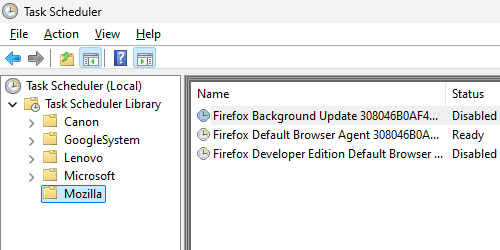
Thank you. The only Mozilla task scheduled is Firefox Default Browser Agent. Although I have Firefox set to check for updates, but do not install set, Firefox just updated. I restarted it and everything went as usual.
So, I'm running the current version, 145.0.1, and every thing is doing fine. I'll keep my fingers crossed, but . . .