


Obtrusive Pop-up

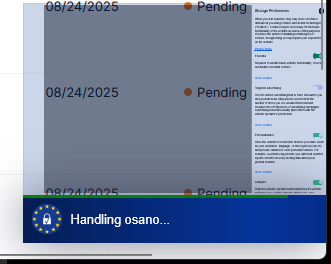
Very often while navigating around the website of a tool I use, I get an intrusive pop-up in the lower right corner. A screen shot is attached.
I first approached the website owner, but they explained it's a browser issue, no a website issue. They did, though, suggest that clearing cookies and cached might help ... But it didn't.
Is there any way to suppress that?
Giải pháp được chọn
Hi
I believe that this message that you are seeing is from Consent-O-Matic. The icon for the add-on matches that in the message that you are seeing.
Tất cả các câu trả lời (5)
Hi Bill
Do you have any add-ons installed in Firefox?
Hi, Paul. Yes. These are pinned to my address bar: LastPass AddToAny Buffer SEOquake Honey Instapaper
These are active but not pinned: Consent-)-Matic Norton Safe Web Close Other Tabs Close Tabs to the Right View Image Info Reborn
Giải pháp được chọn
Hi
I believe that this message that you are seeing is from Consent-O-Matic. The icon for the add-on matches that in the message that you are seeing.
The small popups on bottom right corner of Firefox window may be Web Push Notifications from sites you have allowed to send you notifications. Instead of useful information some may send you junk, spam, fake virus/trojan alerts etc. You can revoke these sites from sending you alerts as you can see with second link below.
https://support.mozilla.org/en-US/kb/push-notifications-firefox https://support.mozilla.org/en-US/kb/push-notifications-firefox#w_how-do-i-revoke-web-push-permissions-for-a-specific-site
Thanks, Paul. I'll disable Consent-O-Matic and hope that clears it up.
James — thanks for this. I'll review and prune my notifications. Thanks for the links!