

Chủ đề này đã được lưu trữ.
Vui lòng hỏi một câu hỏi mới nếu bạn cần giúp đỡ.

Đã lưu trữ
Different colors used in toolbar after upgrade - almost unreadable - what to do?

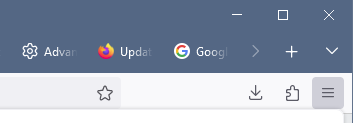
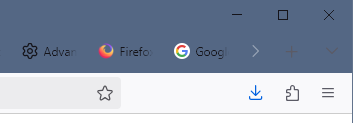
Firefox 114.0.1 https://assets-prod.sumo.prod.webservices.mozgcp.net/media/uploads/images/2025-02-11-10-08-03-3077a4.png Firefox 135.0 https://assets-prod.sumo.prod.webservices.mozgcp.net/media/uploads/images/2025-02-11-10-08-57-f4934b.png
After upgrade from Firefox 114 to 135, toolbar has changed and is almost unreadable. What can I do?
I use Windows 10.
Firefox 114.0.1
https://assets-prod.sumo.prod.webservices.mozgcp.net/media/uploads/images/2025-02-11-10-08-03-3077a4.png
Firefox 135.0
https://assets-prod.sumo.prod.webservices.mozgcp.net/media/uploads/images/2025-02-11-10-08-57-f4934b.png
After upgrade from Firefox 114 to 135, toolbar has changed and is almost unreadable. What can I do?
I use Windows 10.
Tất cả các câu trả lời (2)
Setting browser.theme.windows.accent-color-in-tabs.enabled true saved it. I forgot I used userChrome.css for different colors, see https://superuser.com/questions/1655054/force-firefox-title-bar-to-use-windows-operating-system-theme-colors

Then you need to contact the support where you got your userChrome to provide support for your modifications.