


MOZILLA NOT WORKING AT ALL

DEAR SIR MAM PLZZ HAVE A LOOK
https://drive.google.com/file/d/1iJqUWyr_BYMcOoQj6QvFSaiSEf4NuJR2/view?usp=drive_link
GOOGLE CHROME WORKING FINE BUT FIREFOX AINT WORKING
THANK YOU
mail me at [Email address]
Được chỉnh sửa bởi cor-el vào
Tất cả các câu trả lời (20)
Your Google Drive link is not publicly accessible.
Does it still happen in Troubleshoot Mode?
did u try copy paste ?? tnx or provide email so that i can share?
Hi
We do not have access to that drive. It would be better if you could describe the problem that you are having in a reply to this thread and feel free to include screenshots if nesscary.
I am going to remove your email address from your question for your privacy and security as this is an open forum.
my firefox is not working at all you tell me how to describe this ?? I WANT TO SHARE A VIDEO SO THAT U CAN UNDERSTAND MY PROBLEM ANYWAY HAVE A LOOK AT THE SCREENSHOT , MY FIREFOX ALWAYS REMAINS LIKE THIS UNABLE TO OPEN ANY PAGE THANK YOU
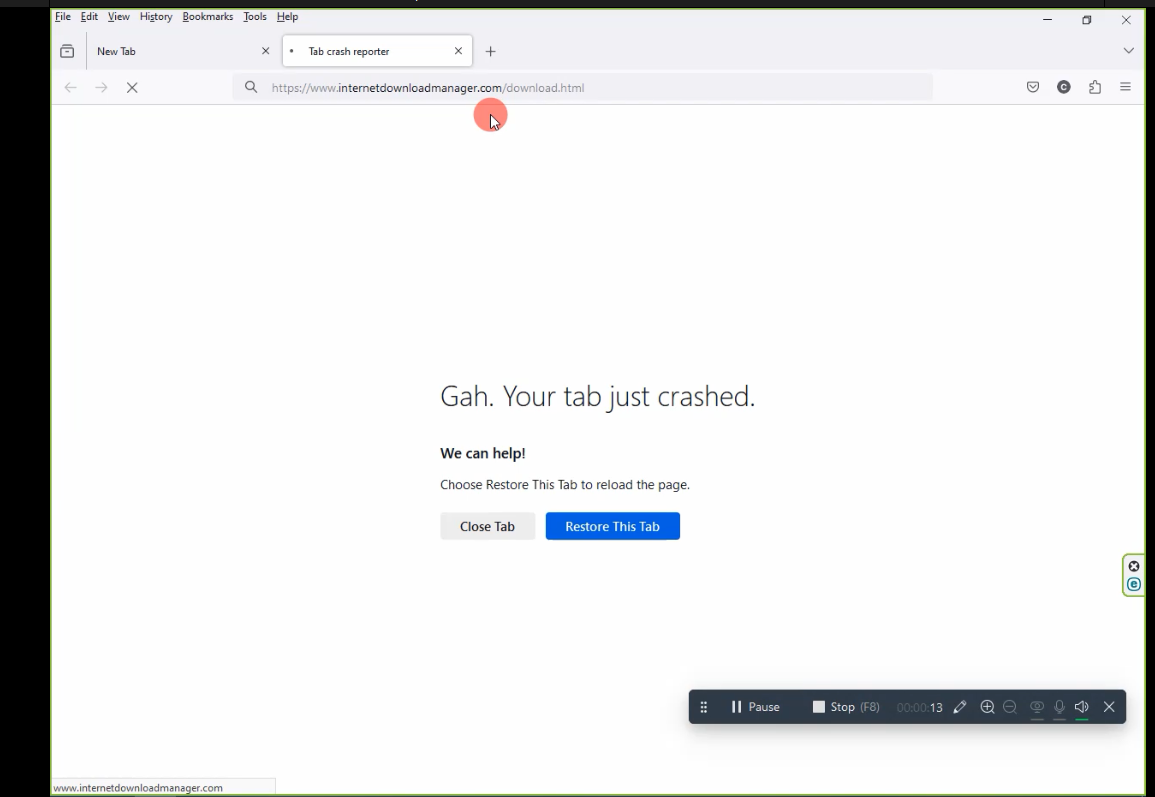
NEW VIDEO LINK ADDED PLZZ CHECK
Do the tabs still crash in Troubleshoot Mode?
Reinstall the Visual C++ Redistributable.
Also, what happens under a different user account? What security software are you running? Windows home or pro version? What version of Firefox?
Can you also check the task manager processes and see if Edge is running?
EVERYTHING IS RUNNING FINE EXCEPT FOR FIREFOX I REINSTALLED THE APP BUT EVEN THOUGH ITS NOT WORKING PLZ NOTE : I HAVE BEEN HAVING THIS ISSUE FOR LAST COUPLE OF WEEKS
WINDOWS - 10 PRO FIREFOX - 122 ESET INTERNET SECURITY -17
THANKS
Được chỉnh sửa bởi Mahien Fofo vào
We're sorry to hear that Firefox is crashing. In order to assist you better, please follow the steps below to provide us crash IDs to help us learn more about your crash.
The crash report is several pages of data. We need the report numbers to see the whole report.
- Enter about:crashes in the Firefox address bar and press Enter. A list of Submitted (and Unsubmitted, if any) Crash Reports will appear, similar to the one shown below.
- Copy the 5 most recent Submitted Report IDs that start with bp- and then go back to your forum question and paste those IDs into the "Post a Reply" box.
Note: If a recent Report ID does not start with bp- click on it to submit the report.
(Please don't take a screenshot of your crashes, just copy and paste the IDs. The below image is just an example of what your Firefox screen should look like.)

Thank you for your help!
More information and further troubleshooting steps can be found in the Troubleshoot Firefox crashes (closing or quitting unexpectedly) article.
EVEN AFTER TROUBLE SHHOTING ITS NOT WORKING ONLY GOOGLE CHROME WORKS, LIKE A CHARM
SIR WHEN I TYPE about:crashes AND PRESS ENTER NOTHING HAPPENS IT JUS REMAINS LIKE THAT do you want me to share any video proof.. ? tnxx
Please can you try installing the latest Release version of Firefox, not the Beta or the Developer Edition.
Does the Release version work?
https://mega.nz/file/0psBiSTZ#3jVKhklc0USy3E5dVp43vlsiu3dQuckF2Y7PTf5EiK0
SIR NEW VIDEO UPLOADED PLZZ CHECK TNXX
Mahien Fofo said
EVERYTHING IS RUNNING FINE EXCEPT FOR FIREFOX I REINSTALLED THE APP BUT EVEN THOUGH ITS NOT WORKING PLZ NOTE : I HAVE BEEN HAVING THIS ISSUE FOR LAST COUPLE OF WEEKS WINDOWS - 10 PRO FIREFOX - 122 ESET INTERNET SECURITY -17 THANKS
Thanks for the info. Can you try Windows Sandbox and see if you have the same issues. https://www.howtogeek.com/399290/how-to-use-windows-10s-new-sandbox-to-safely-test-apps/
Also, disable ESET, reboot, and see if it helps.
+1 for temporarily disabling ESET security software. You may need to reboot into Windows Safe Mode to fully disable it.
dont know how to use it , too complicated
SIR PLZZ HELP