


Windows 10 reached EOS (end of support) on October 14, 2025. For more information, see this article.

Tìm kiếm hỗ trợ

Tránh các lừa đảo về hỗ trợ. Chúng tôi sẽ không bao giờ yêu cầu bạn gọi hoặc nhắn tin đến số điện thoại hoặc chia sẻ thông tin cá nhân. Vui lòng báo cáo hoạt động đáng ngờ bằng cách sử dụng tùy chọn "Báo cáo lạm dụng".

Tìm hiểu thêm

Default Amazon Search Thinks I'm in Canada

  • 3 trả lời
  • 1 gặp vấn đề này
  • 42 lượt xem
  • Trả lời mới nhất được viết bởi -elison-

tuỳ chọn khác

I was using a VPN set to Canada a little ways back, and now Firefox seems to believe I'm forever in Canada. Any time I go to use the default Amazon search included with the browser now, it defaults to Amazon.ca rather than Amazon.com. I've tried going to Amazon.com directly and manually adding the search, but that just gives me an error message. I don't have anything set to Canada at all anymore. How do I get my Amazon search to go back to normal? Is there something on the back-end I can edit to fix it?
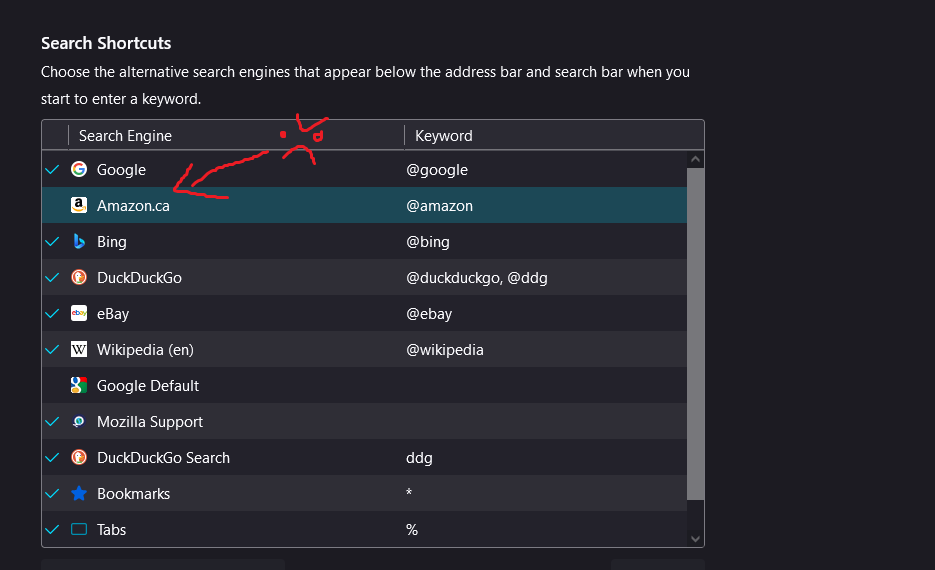
I was using a VPN set to Canada a little ways back, and now Firefox seems to believe I'm forever in Canada. Any time I go to use the default Amazon search included with the browser now, it defaults to Amazon.ca rather than Amazon.com. I've tried going to Amazon.com directly and manually adding the search, but that just gives me an error message. I don't have anything set to Canada at all anymore. How do I get my Amazon search to go back to normal? Is there something on the back-end I can edit to fix it?
Đính kèm ảnh chụp màn hình

Giải pháp được chọn

Hello! You can try: Open a New Tab and type about:config> Search browser.search.region> Double-click> Type in your region(abbreviated)

Đọc câu trả lời này trong ngữ cảnh 👍 1

Tất cả các câu trả lời (3)

tuỳ chọn khác

Giải pháp được chọn

Hello! You can try: Open a New Tab and type about:config> Search browser.search.region> Double-click> Type in your region(abbreviated)

tuỳ chọn khác

That fixed it! Thank you so much!

tuỳ chọn khác

You're Welcome! :)