


Transparent dropdown menus after upgrade to Firefox 90

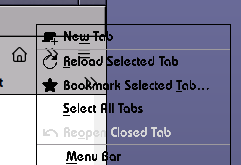
I just upgraded from FF 89 to FF 90 (on Ubuntu) and the drop down menus (accessed on right-click) are now transparent. I have changed the theme, changed my desktop theme, started FF in troubleshoot mode, disabled acceceration in about:config, and it makes no difference, the menus are still transparent. This makes it difficult to use the browser.
Is this fixable or is it a bug in the latest release?
Giải pháp được chọn
Update: I found the fault was in theme I was using. I had switched themes before to test if that was the source but it seems the change wasn't fully applied to Firefox. So not something in Firefox. Thanks.
Đọc câu trả lời này trong ngữ cảnh 👍 0Tất cả các câu trả lời (6)
PS. I also started with a fresh profile and the issue persists
You can try to disable WebRender by setting this pref to true on the the about:config page to see if that has effect.
- gfx.webrender.force-disabled = true
You can open the about:config page via the location/address bar. You can accept the warning and click "I accept the risk!" to continue.
Try the Firefox version from the official Mozilla server if you currently use a version from the repositories of your Linux distribution.
Hello and thank you for your reply.
I'm afraid the issue persists after trying both solutions.
Simon
Giải pháp được chọn
Update: I found the fault was in theme I was using. I had switched themes before to test if that was the source but it seems the change wasn't fully applied to Firefox. So not something in Firefox. Thanks.
Được chỉnh sửa bởi Psimonics vào

I'm still having this issue after downloading the Mozilla compiled version, using a clean configuration, etc.
No installed themes used, no addons, and its still having the issue.
It is annoying but the browser still works. Any idea when the theme issue is going to be fixed?
@adnieman
Have you tried changing your desktop theme? In my case it was the GTK 3 theme I was using that generated the issue. I can't find where, I'm not techie enough, but changing my desktop theme worked.
I suspect a few GTK themes will not work with the latest firefox interface., as I found that accessing "about:config" from the address bar, searching for "browser.proton.enabled" and marking to "false" solved the issue with the offending theme. It restores firefox to the previous pre-89 interface.
Update: I found that you need to make sure the GTK3 theme gtk.css file in the theme folder contains a setting for the menu background colour. Eg. Mine is:
menu {
background-color: @base_color;
}
Adding the line "background-color: @base_color;" to the above menu section fixes the clear menu issue.
Hope this helps, Simon
Được chỉnh sửa bởi Psimonics vào