


Bookmark Toolbar drops down everytime I bookmark a site
Its really annoying can someone please tell me what I have to do so when i bookmark a site again it does not drop down the bookmark toolbar
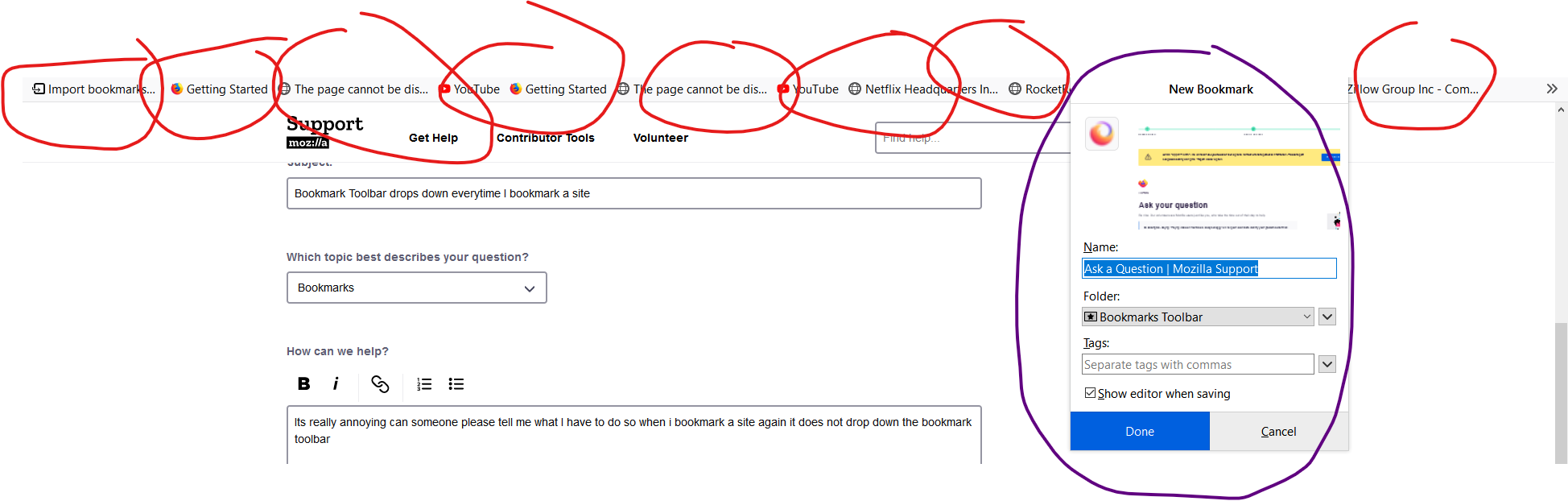
I sent an image showing the bookmark toolbar which appears every time i book mark a site i circled each bookmark in the tool bar with red, I circled the bookmark window purple all i want to appear is the bookmark windows asking me where would i like to store this bookmark i do not want the bookmark toolbar appearing every time i bookmark a site
it is very annoying please help!
Tất cả các câu trả lời (3)
Looks that you have set the Bookmarks Toolbar as the default location for saving a new bookmark and Firefox is showing this toolbar when saving a bookmark to that location to make you aware. Firefox stores the last used location automatically in browser.bookmarks.defaultLocation (about:config) and should select that folder with next saves. Possible values for browser.bookmarks.defaultLocation : toolbar|menu|unfiled|guid
What is your preferred location for saving the new bookmark ?
Just to be sure:
Start Firefox in Safe Mode to check if one of the extensions ("3-bar" menu button or Tools -> Add-ons -> Extensions) or if hardware acceleration or userChrome.css is causing the problem.
- switch to the DEFAULT theme: "3-bar" menu button or Tools -> Add-ons -> Themes
- do NOT click the "Refresh Firefox" button on the Safe Mode start window
Được chỉnh sửa bởi cor-el vào
I don't know, all i know is when i used to bookmark a website it would not show that bookmarktoolbar underneath my url bar
Never mind my brilliant Queen like bestie by what you said saved the day