


Cannot read Menu Bar (TopLeft corner of screen) - Have not found how 2 fix it - Firefox Quantum 64.0.2 (64 Bit)
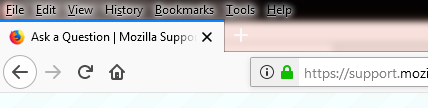
Small black type on mottled grey background difficult to read. (Image 1) On hover background changes to mottled blue which is also difficult to read. (Image 2)
Tất cả các câu trả lời (4)
See this support article. How do I create a screenshot of my problem? It is best to use a compressed image type like PNG or JPG to save the screenshot and make sure that you do not exceed a maximum file size of 1 MB.
Then use the Browse .... button below the Post a Reply text box to upload the screenshot.
Thank you for your input.... I used Microsoft SNIPPING TOOL to collect "Image 1" and save to my desktop (24.3 kb PNG file) prior to attempting to attach to my question.
here is Image 1 meeting specification suggested above
Start Firefox in Safe Mode to check if one of the extensions ("3-bar" menu button or Tools -> Add-ons -> Extensions) or if hardware acceleration is is causing the problem.
- switch to the DEFAULT theme: "3-bar" menu button or Tools -> Add-ons -> Appearance
- do NOT click the "Refresh Firefox" button on the Safe Mode start window