


print selection not available

The print selection option is not available (it shows uo grow and cant be selected) from firefox. It used to be but stopped a while ago. I've tried selecting different parts of many websites and it never works any more. Ive got the latest version of firefox. The printer is an epson wf-5690 if that helps.
Tất cả các câu trả lời (2)

Giải pháp được chọn
Hi, sorry to hear you are having a printing problem; please see if anything here helps -
You could also try Safe Mode in case an add-on you have is interfering. Firefox Safe Mode is a troubleshooting mode that temporarily turns off hardware acceleration, resets some settings, and disables add-ons (extensions and themes).
If Firefox is open, you can restart in Firefox Safe Mode from the Help menu:
- Click the menu button
 , click Help
 and select Restart with Add-ons Disabled.
If Firefox is not running, you can start Firefox in Safe Mode as follows:
- On Windows: Hold the Shift key when you open the Firefox desktop or Start menu shortcut.
- On Mac: Hold the option key while starting Firefox.
- On Linux: Quit Firefox, go to your Terminal and run firefox -safe-mode
(you may need to specify the Firefox installation path e.g. /usr/lib/firefox)
When the Firefox Safe Mode window appears, select "Start in Safe Mode".
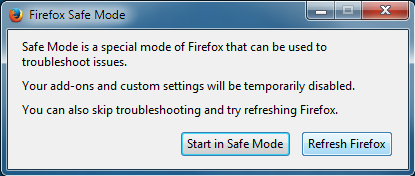
If the issue is not present in Firefox Safe Mode, your problem is probably caused by an extension, theme, or hardware acceleration. Please follow the steps in the Troubleshoot extensions, themes and hardware acceleration issues to solve common Firefox problems article to find the cause.
To exit Firefox Safe Mode, just close Firefox and wait a few seconds before opening Firefox for normal use again.
When you figure out what's causing your issues, please let us know. It might help others with the same problem. Thank you!
Thanks for your help on this. I tried a number of things then I went into Help, Troubleshooting Information, and clicked on Refresh Firefox which worked!!! Great support from the forum, thank you.