

Chủ đề này đã được lưu trữ.
Vui lòng hỏi một câu hỏi mới nếu bạn cần giúp đỡ.

Đã lưu trữ
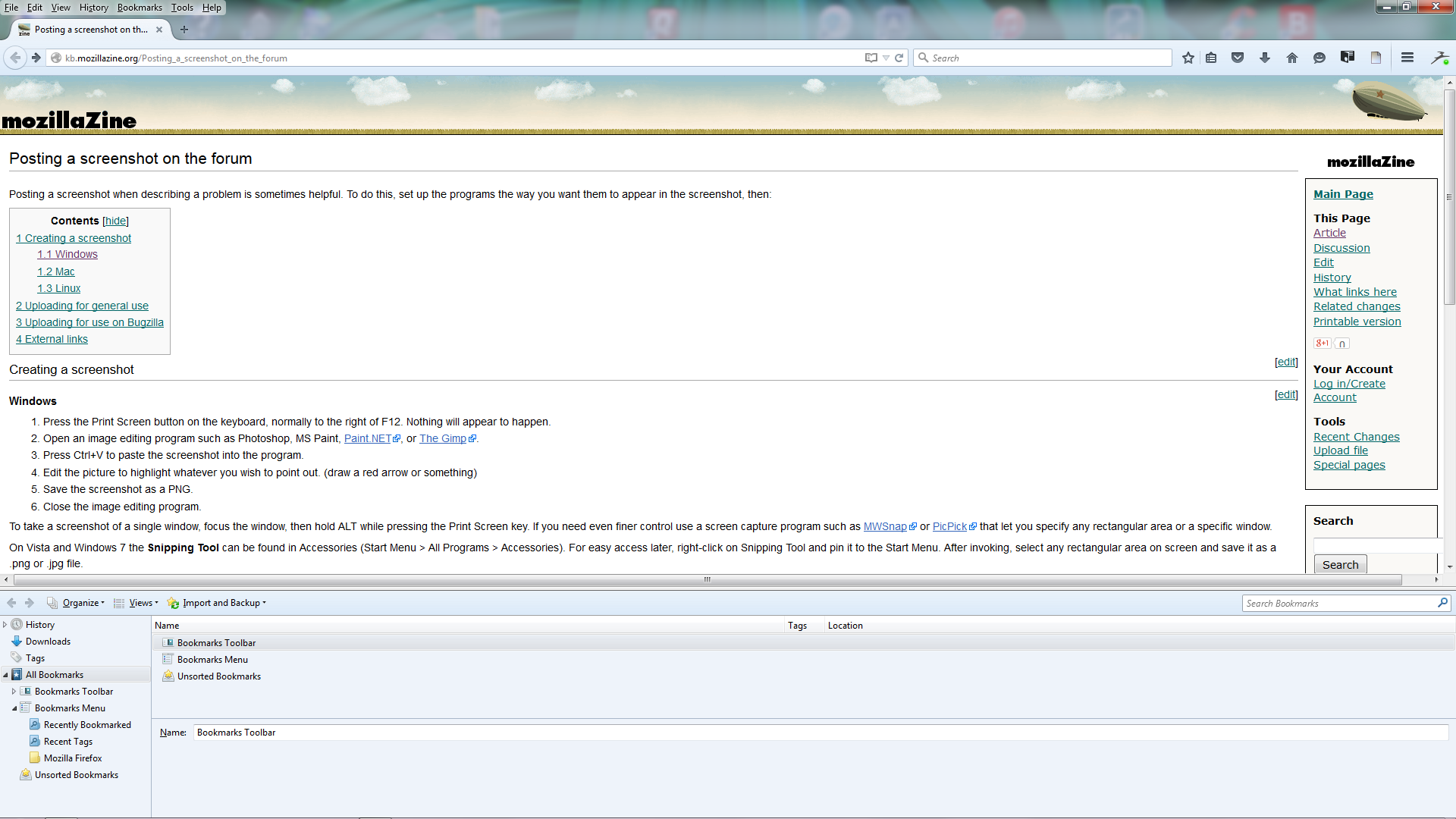
Sliding Show all Bookmark window is appearing and splitting all web pages (see screenshot).

Can open bookmarks when I want thru Firefox menu. Problem is the opened Show All Bookmarks sub menu is appearing in the lower half of all Firefox web pages that I open, splitting the page. I can slide this bookmark page down to make it disappear or up to cover the web page. Am looking for a solution to prevent it from appearing in Firefox at all unless I click on bookmarks it in the menu bar to get the drop down menu. Your help would be appreciated.
Can open bookmarks when I want thru Firefox menu. Problem is the opened Show All Bookmarks sub menu is appearing in the lower half of all Firefox web pages that I open, splitting the page. I can slide this bookmark page down to make it disappear or up to cover the web page. Am looking for a solution to prevent it from appearing in Firefox at all unless I click on bookmarks it in the menu bar to get the drop down menu. Your help would be appreciated.
Tất cả các câu trả lời (1)
See what happens in the Firefox SafeMode.