


How do I get Firefox's camera settings instead of Flash's?

When I use a website that wants to access my webcam, I usually get a Flash Settings dialogue because the site uses Flash to do the webcam feed, but on sites not using Flash (sorry, I have no idea what they use instead), I get a dialogue from Firefox, directly under the address bar.
Basically, I want to see that dialogue, even when a site uses Flash with my webcam. I ALWAYS want to use Firefox's own settings dialogue. How do I make it pop up on sites that use Flash?
Tất cả các câu trả lời (3)
Couldn't add this to my question, so I'll add it as a reply. This is a screenshot of the Firefox dialogue that I WANT to show up, but will only show up when the site isn't using Flash.
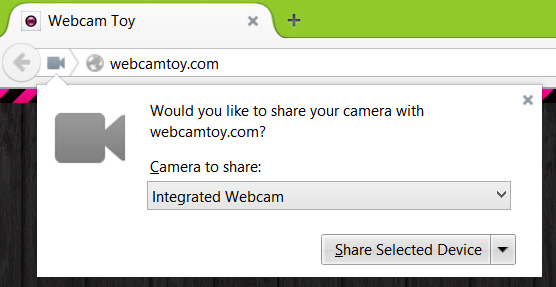
That is a WebRTC setting that you can find in "Tools > Page Info > Permissions" for the domain in the current tab.
As far as I can tell, this is for developers, rather than users. Does that mean that, if a website is using flash, (like Google+, for instance) that as a user, I cannot force the Firefox dialogue to appear, and I have to use the Flash one?