Delete boxes for emails no longer visible

Usually when I open mail, there are boxes next to each email that I can click to delete. They are gone and I have on the left side a vertical list of tabs that begin with Mail, Calendar, and People and others follow. This panel was not there before and I cannot figure out how to remove it--I think this will restore the boxes I use to delete emails.
എല്ലാ മറുപടികളും (1)
eparker32 said
This panel was not there before and I cannot figure out how to remove it--I think this will restore the boxes I use to delete emails.
I do not think it will do much at all really. It is called the space tooolbar and has been around not for a few years. I personally hate is and reduce it to an icon on my toolbar.
You will see an icon like this at the bottom of the spaces bar  click it and the spaces bar will be a memory.
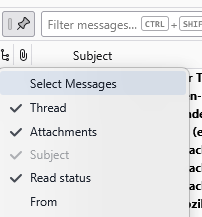
Now to the actual issue you started with. Apparently you have enabled the accessibility feature to select each mail. Personally I can not think of anything more frustrating. I just click on the entry to select it and press the delete key. But it also is simple to enable that accessibility feature.
Right click the list of titles on the top of your mail list (I used the bit where it said subject) and select "select messages" from the menu offered.