Open
How to Edit/Accept Proper Spelling in Dictonary FireFox Uses? I'm attempting to add town name to remove red misspelled line.

I am attempting to edit a free certificate online before printing it out. I'm using the certificate's online editor to edit it's text. I'm not sure where the dictionary is in Firefox, but our town's name comes up with a red, misspelled line under it. I had "added it to dictionary" on Word years ago, but I can not print out the certificate until I remove the red line, and when I right click on the text box, since it's inside the website's text editor, no spelling error comes up.
Can I independently edit the dictionary that Firefox uses, to add my town's name, and person's last name to it, to remove this red line?
I am attempting to edit a free certificate online before printing it out. I'm using the certificate's online editor to edit it's text. I'm not sure where the dictionary is in Firefox, but our town's name comes up with a red, misspelled line under it. I had "added it to dictionary" on Word years ago, but I can not print out the certificate until I remove the red line, and when I right click on the text box, since it's inside the website's text editor, no spelling error comes up.
Can I independently edit the dictionary that Firefox uses, to add my town's name, and person's last name to it, to remove this red line?
എല്ലാ മറുപടികളും (2)

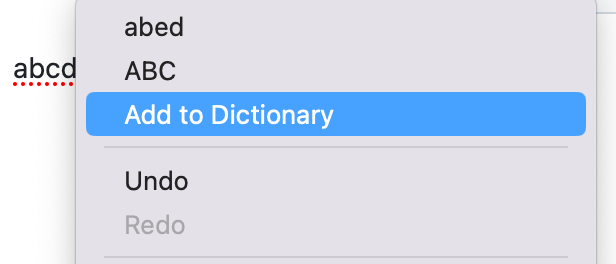
Try right clicking on the mispelled word instead of the text box. There should be an option to add the word to the dictionary.