


I have problems with my Orcon emails and they say it is Thunderbird.

On Saturday morning 27 June 2026 I tried to login my Orcon email account via Thunderbird (which I have been using for a long time). But my login didn't work, I got a message saying "login to POP3.orcon.net.nz with username habitation failed." On 30th June 2026 I reported the problem to Orcon.
Orcon gave me the following settings for Thunderbird. I have done that and even made a new account: Incoming Server Type: IMAP Mail Server: imap.orcon.net.nz Port: 143 SSL: Off Authentication: On (username and password required)
Outgoing SMTP Server: Mail Server: smtp.orcon.net.nz Port: 25 SSL: Off Authentication: Off
Since then I have spent many hours and going around in circles with Orcon's Technical Support to resolve this, but no luck. They blame Thunderbird. I used Thunderbird Troubleshoot Mode. The message that comes up reads: login to server mail orcon.net.nz with username habitation failed. Please can you check that your server settings above are correct? And if there is a bug? Irma
Chosen Solution
Hi All
Yahoo !!! Finally Thunderbird is working again!
From the beginning I have said to Orcon that they blocked me and that it was not Thunderbird. Ofcourse they denied it but now it has been proven that I and others were right.
I would like to thank all of you very very much and being so very patient with me, it meant a lot to me.
I'll make a nice donation to Thunderbird.
AGAIN THANK YOU ALL
എല്ലാ മറുപടികളും (83)
Rick said
Ed, if the account is set up as POP in Thunderbird, won’t deleting it lose messages?
No - When you remove a pop account, the data in /profile name/Mail/pop account remains.
So when you remove the account via 'Account Settings', then remove the stored passwords via 'Settings' > 'Privacy & Security' , exit Thunderbird and then restart Thunderbird (to ensure all prefs and file etc are updated), you can recreate a new POP account for email address and then set up the Account Settings' > account name >'Local directory:' to point to the original folders and see all emails again.
But if emails are still on server then an IMAP account will still locate those emails. Either way, the emails should not be lost and it should be possible to recover even if only visible in Local Folders account. But that is a Separate topic.
IMAP accounts can only display whatever is on the server. It's like a mirror image. IMAP account folders synchronise with server in order to display whatever is on server - unlike POP - Pop does not synchronise with server - it only has access to server Inbox in order to download mail to pop Inbox. You can choose whether to leave messages on server or not.
IMAP account can fully download emails and this is very useful as it means you can then create a backup of the entire profile including emails which is completely independent of the server. IMAP account can also only download headers and this may save you space on your computer - in which case it downloads emails when you select to read them and stores in a temp folder to facilitate viewing. Or variants as well - but that's another topic. The point is this, if you delete an email via webmail, it will get removed from your imap account when it synchronises with server and vis versa.
Please check everything I've listed below in the order listed. Do not assume anything.
Firewall The firewall is either controlled by the default on computer or controlled by an Anti-Virus you installed. It's important you do not want your own computer blocking any ports etc that Thunderbird need to use. Access the Firewall and make sure the Thunderbird program is set up as an allowed program. If using Windows OS, you would typically find it installed in this location:
- C://Program Files/Mozilla Thunderbird/thunderbird.exe
VPN: Please double check - many Anti-Virus products now have their own VPN and in some cases it does get auto enabled and server will not like VPN as it hides your IP address and server may think you are a hacker. In Thunderbird IF you actually created an imap account - access Account Settings and remove it.
In Thunderbird
- Settings > Privacy & Security
- scroll down to Passwords section
- Click on 'Saved Passwords'
- Do you see any mention of your orcon account where username = orcon email address.
- If yes, then remove all of them.
Exit Thunderbird - wait a few moments and then restart Thunderbird and create the account. Then when you create new account and enter : Your name, your email address and password Thunderbird should locate the correct settings but servers do alter their requirements and you cannot guarantee that Thunderbird has been informed, so you may need to manually check every detail. You may also discover thunderbird put the entire email address in the username field because virtually all servers want full email address as username - but orzon may be one of those that only wants the first part of email address - the bit before the '@' sign. So you might get an initial fail due to something being incorrect.
You can click on the 'advanced config' to manually edit things.
The orcon.net server settings are: Account Type: IMAP
- Server name: mail.orcon.net.nz
- Port: 993
- Connection Security: SSL/TLS
- Authentication Method: Normal Password
- Username :enter the first part of your Orcon Email address, without the @orcon.net.nz.
It's important to get the spelling correct, all lowercase and do not add any full stops or spaces etc
- Password: must be exactly the same password you use to access webmail account, it is case sensitive
Outgoing mail server (SMTP):
- server name: mail.orcon.net.nz
- port: 587
- Connection Security: STARTTLS
- Authentication Method: Normal Password
- User Name, enter the first part of your Orcon Email address, without the @orcon.net.nz.
- Password: must be exactly the same password you use to access webmail account,it is case sensitive
Then 'Test' connection and create the account.
Hi Rick Was my last screenshot any help for you? Irma

Irma van der Linden said
Hi Rick Was my last screenshot any help for you? Irma
Your question must be meant for Ed. I know little about ports.
Toad-Hall and I have both suggested that you try using only the first part of your e-mail address (the part before the @ sign) as your username. Have you tried it?
Have tried it several times before. Tried it again this morning (hoping that MAYBE Orcon has found the problem and didn't tell me - wishful thinking): no luck.

Have you set up the Firewall to allow the Thunderbird program ? If no then please do it before you create the mail account because it's vitally important to know you have set it up - post an image showing you have done this.
Also what Anti-Virus are you using?
Did you remove any account you created from Account Settings and then access the saved passwords and completely remove anything for that account/email address ? If no then please do it.
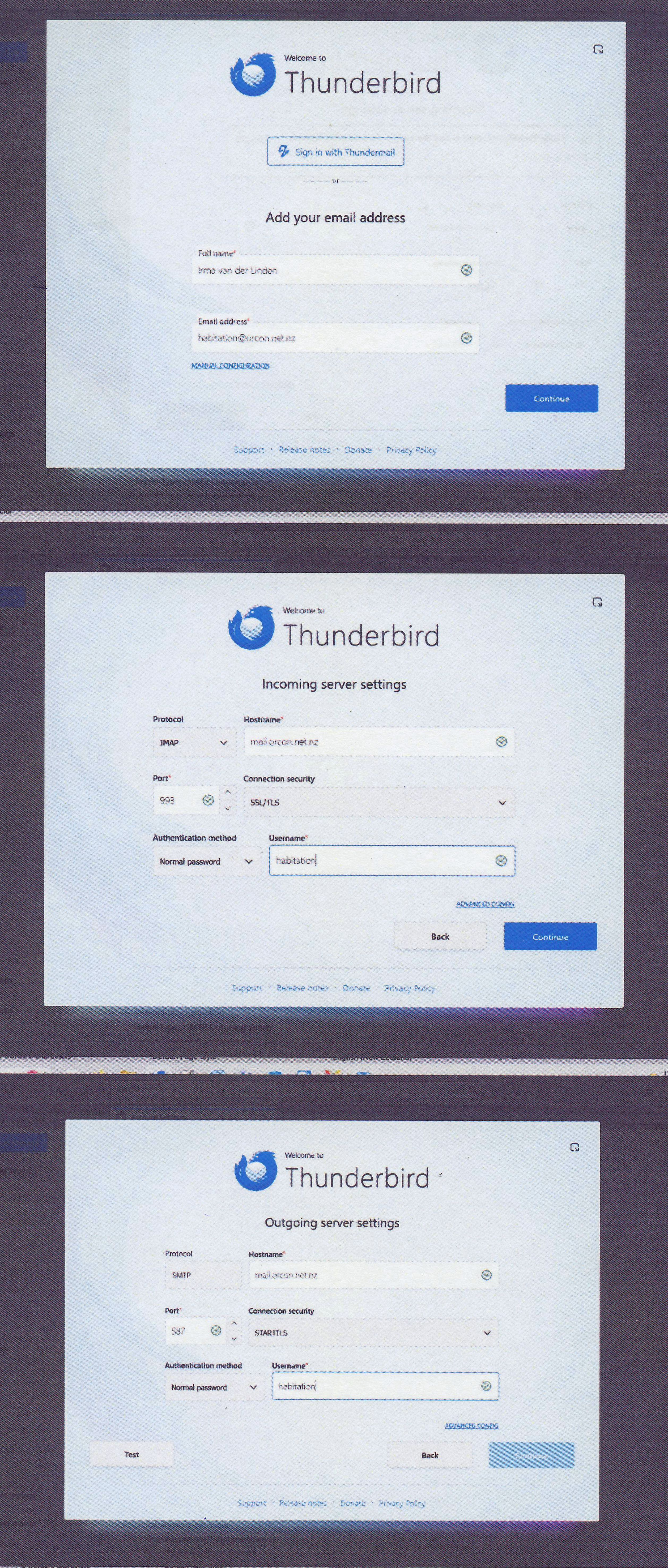
Please follow my previous instructions to create the account and post images showing you are actually using the correct server settings and username because so far all images you have posted confirm you were using wrong settings, so I would not expect it to work.
Hi See screenshot re Firewall/Anti Virus
Not sure how to do the removing etc. Screenshots 9, 9a, 9b show you what I get now when I open Thunderbird.
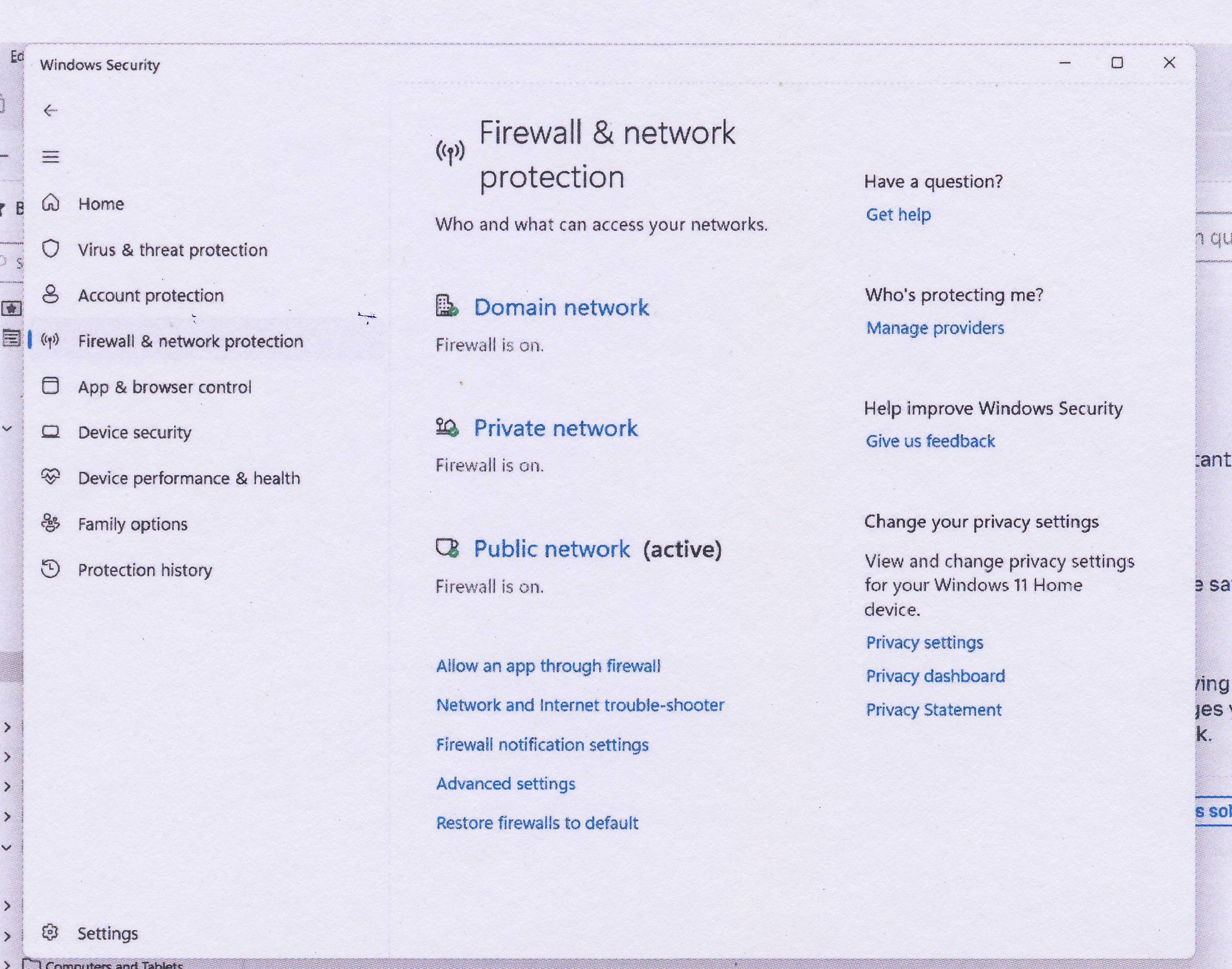
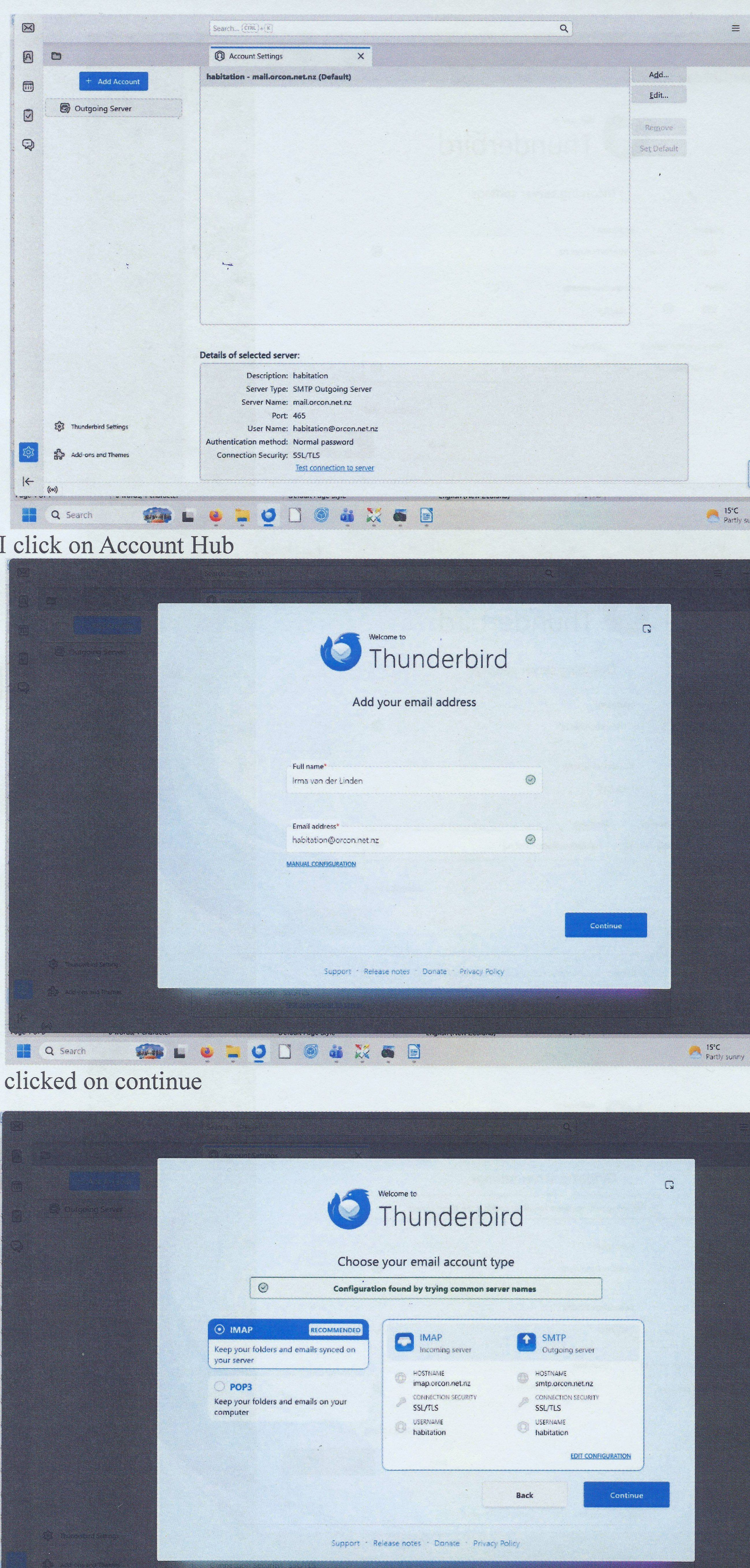
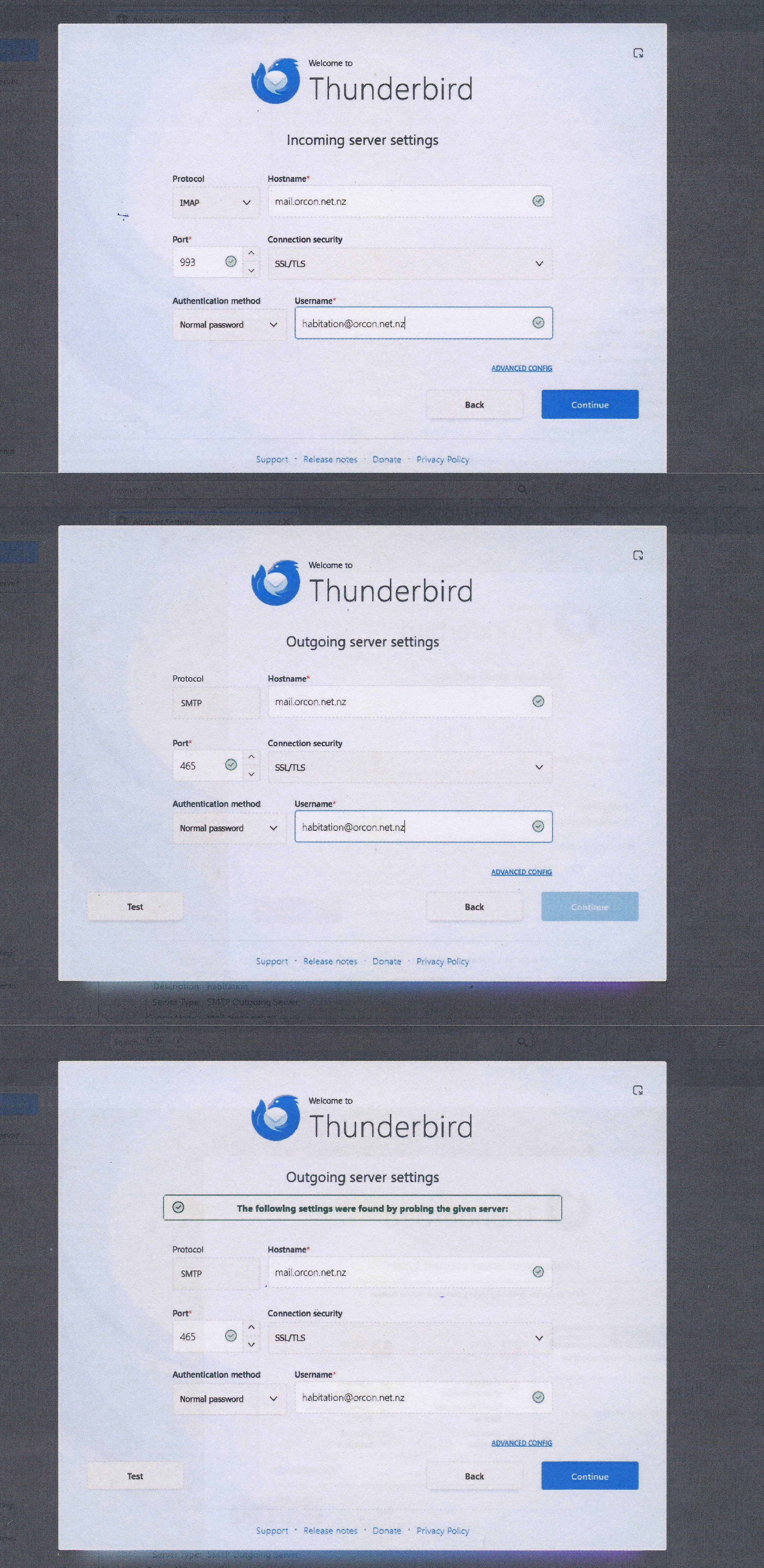
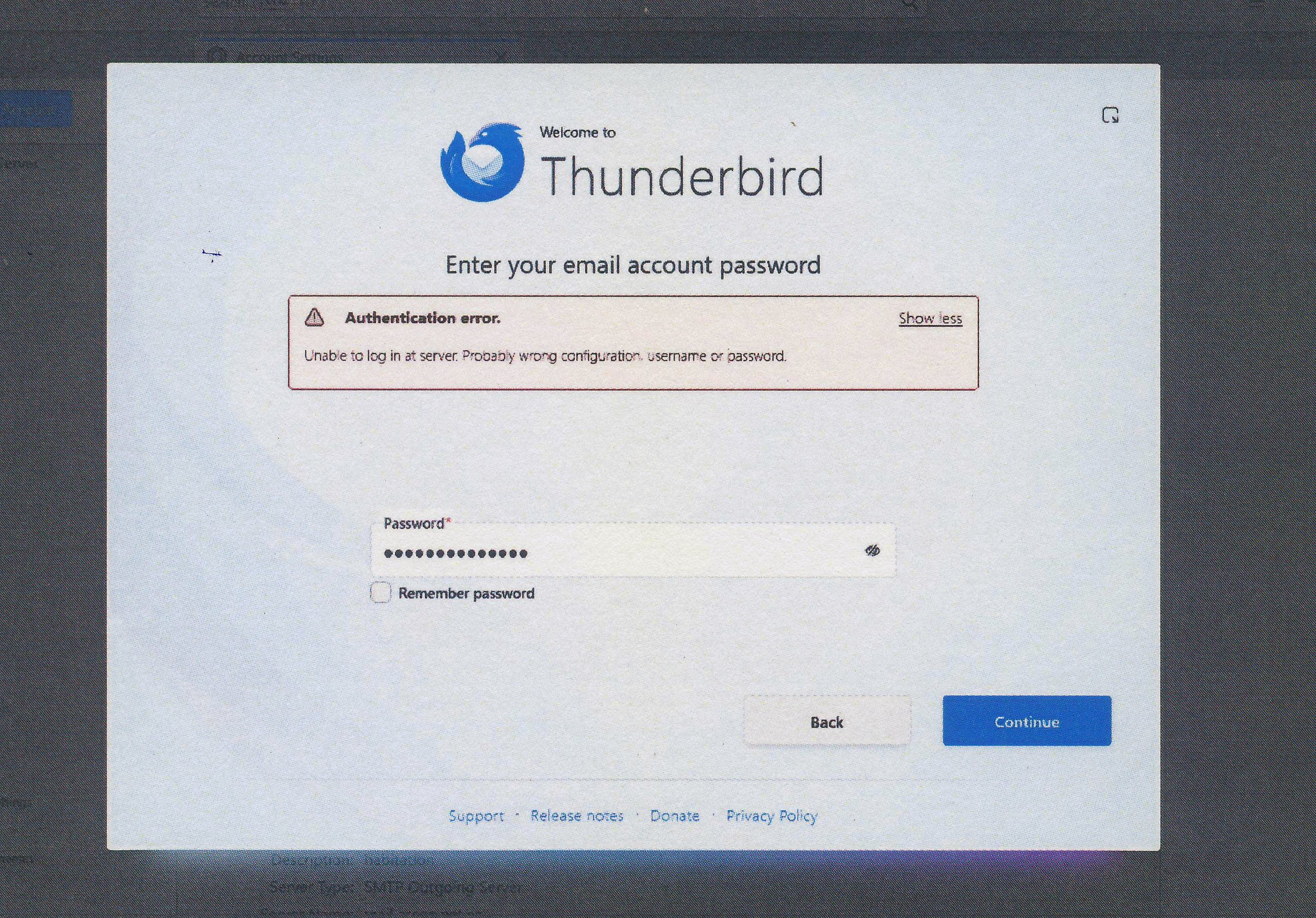
re :See screenshot re Firewall/Anti Virus
Image does not show that you have allowed Thunderbird program. In that Firewall image did you click on 'Allow an app through Firewall' ? If no then click on it. Then you have to set the Thunderbird program as an allowed program. Then post an image showing you have done it. So we can see that the Thunderbird program is now an allowed app.
Once we certain Thunderbird program is not being blocked by Firewall.....
RE creating mail account
You posted a load of good images showing that you seem to have entered wrong data. Let's try using the 'Manual Configuration' option and NOT the auto configuration via 'Continue'.
Please be absolutely certain that the password you use is correct. You must be able to use it to access webmail account via a browser. So test that first.
- Enter name
- Enter email address
- click on 'Manual Configuration'
Then check you have the following:
- Protocol: IMAP
- Server name: mail.orcon.net.nz
- Port: 993
- Connection Security: SSL/TLS
- Authentication Method: Normal Password
- Username :enter only the first part of your Orcon Email address, the bit before '@orcon.net.nz'.
It's important to get the spelling correct, all lowercase and do not add any full stops or spaces etc
- Password: must be exactly the same password you use to access webmail account, it is case sensitive
Outgoing mail server (SMTP):
- server name: mail.orcon.net.nz
- port: 587
- Connection Security: STARTTLS
- Authentication Method: Normal Password
- User Name, enter the first part of your Orcon Email address, without the @orcon.net.nz.
- Password: must be exactly the same password you use to access webmail account,it is case sensitive
When you have manually entered all the required data - post an image so we can see what you have entered.
Then click on 'Test' connection - post an image showing the results.
Modified by Toad-Hall
Greetings - once this becomes solved, please be sure to mark one of the comments as solving the problem. Thanks.
Hi Toad-Hall I can't find Thunderbird in that list of Allow an app .... see screenshot11
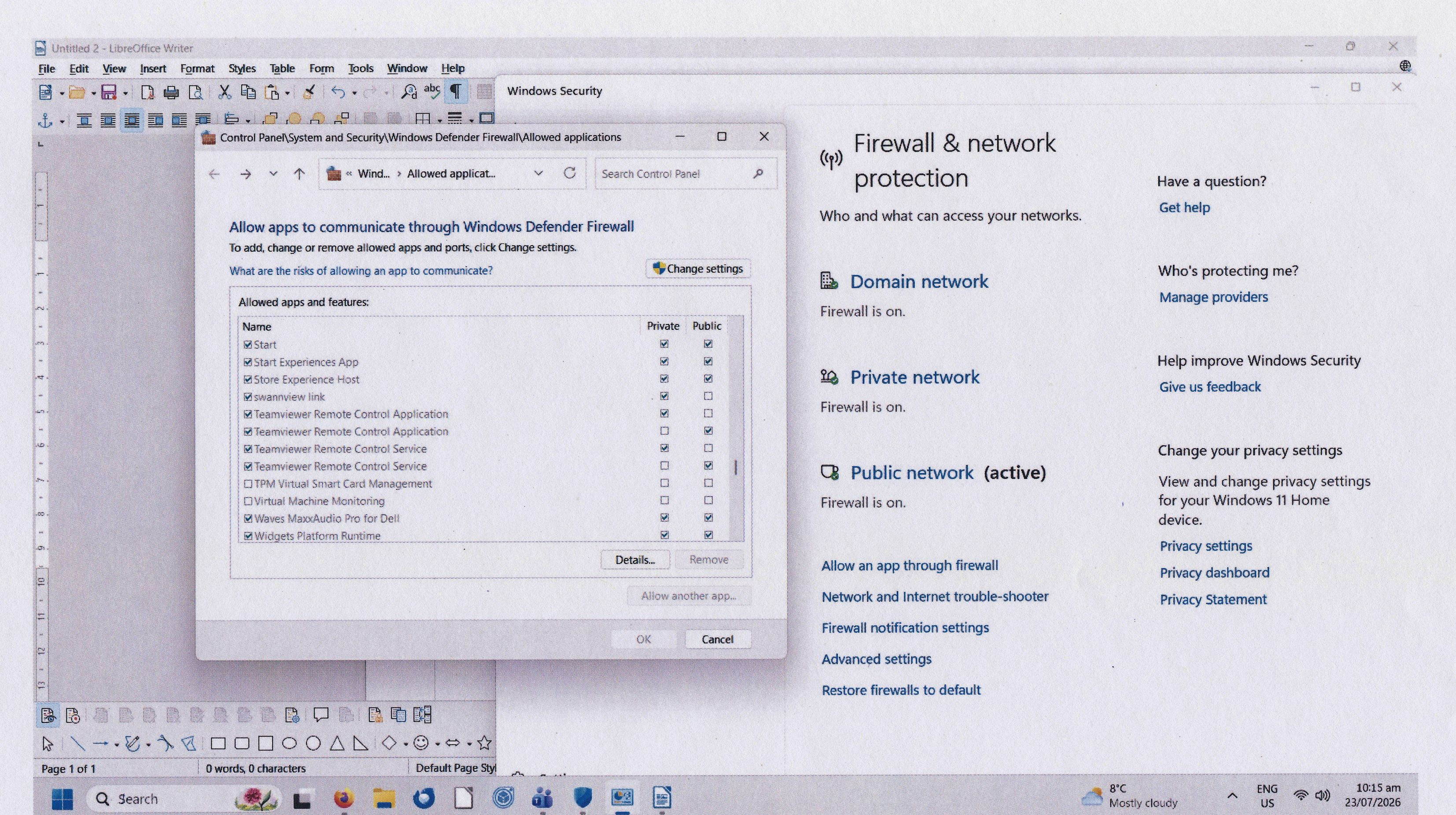
HI Toad-Hall
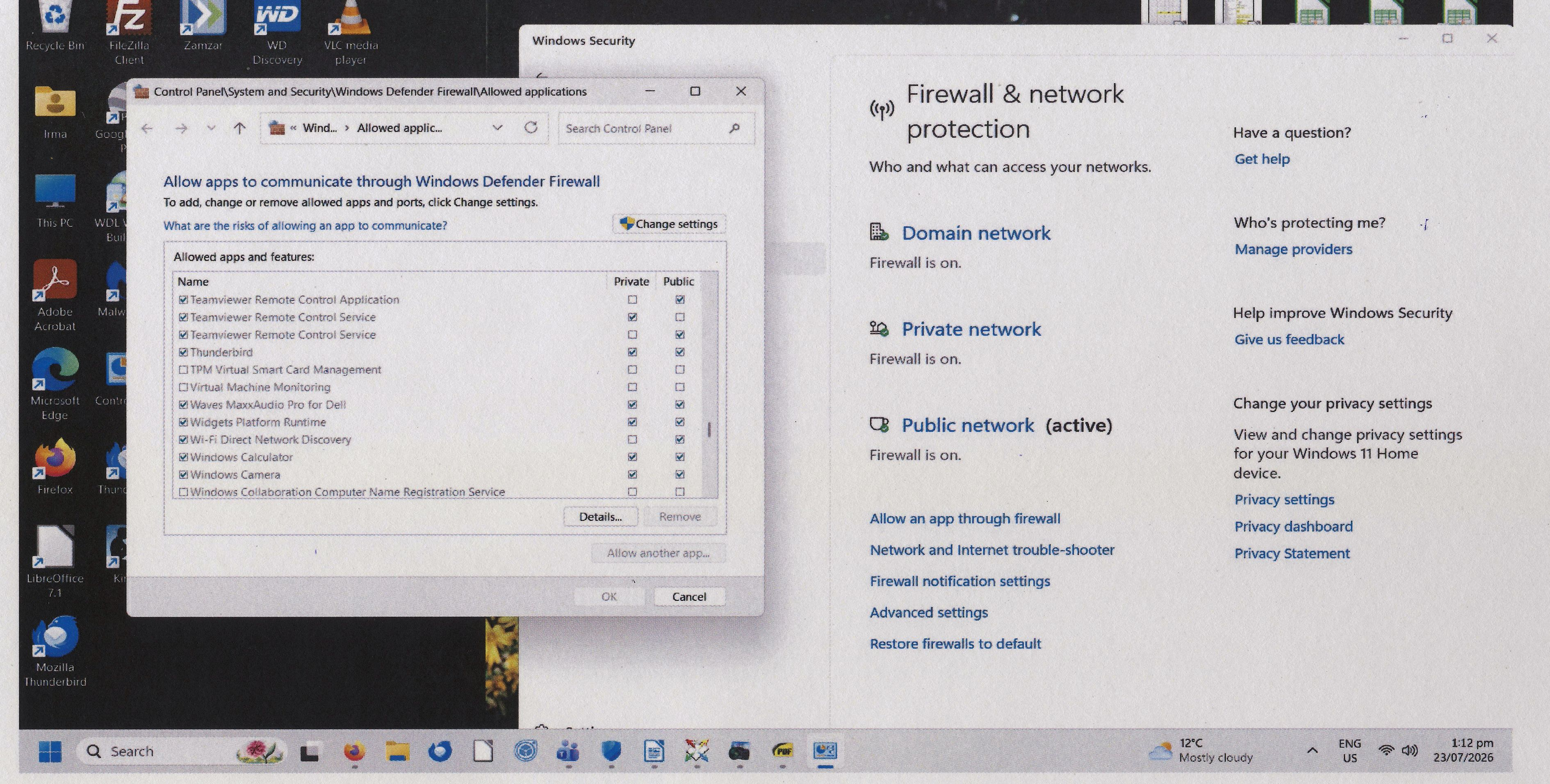
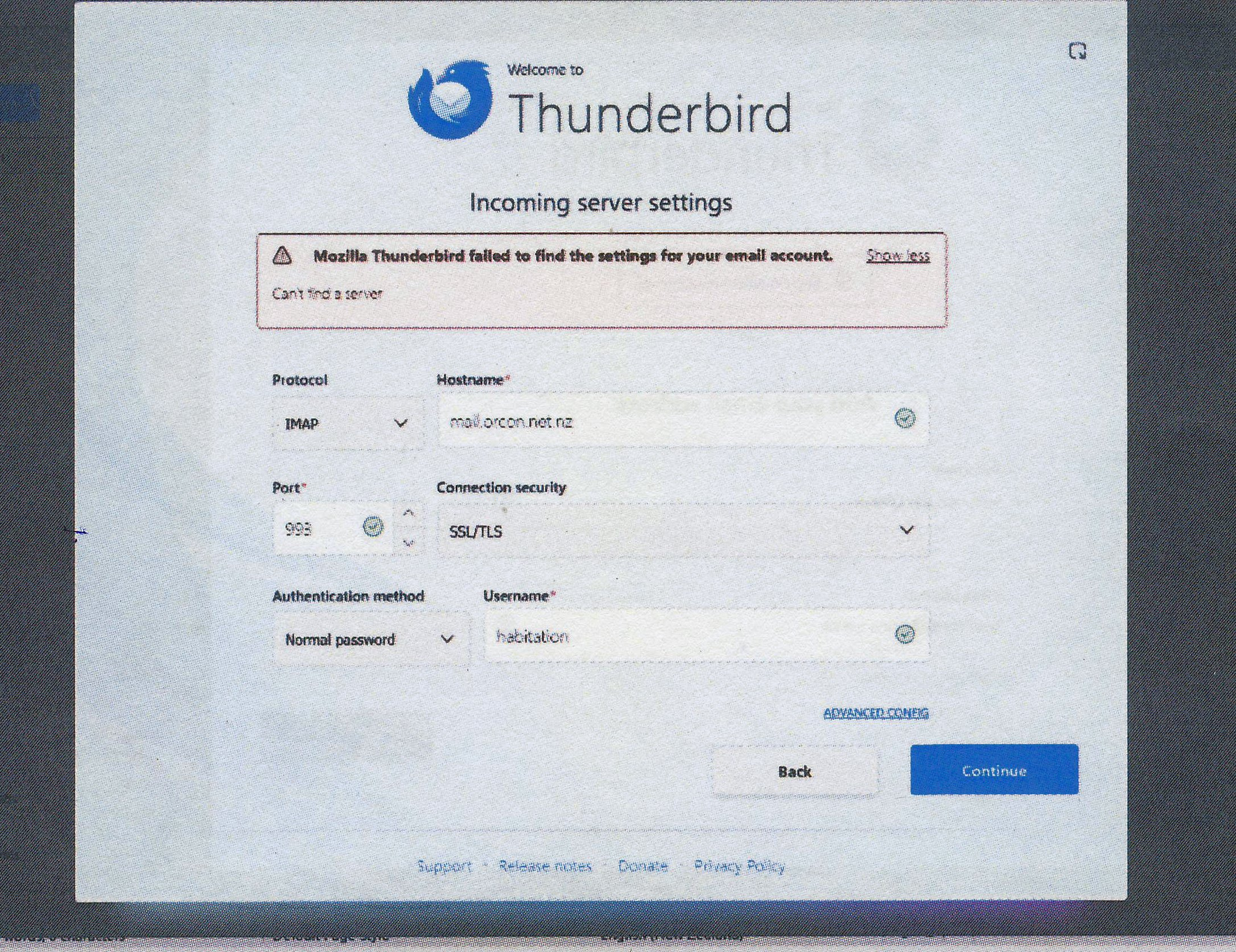
I have added Thunderbird to the Firewall to make sure it is not blocked. See screenshot12 and after that I tried as you specified see screenshot 13 and 13a.
FWIW, I don't have a TB entry in the firewall. Try changing unchecking 'Public'. If you still get the error, remove it altogether.
Modified by Ed
Ed said
FWIW, I don't have a TB entry in the firewall. Try changing unchecking 'Public'. If you still get the error, remove it altogether.
It's always advisable to have Thunderbird as allowed to ensure the computer is not blocking anything. private and public should be selected.
Those settings are good and indicate that nothing is being blocked.
Irma
Did you restart the computer just to confirm all new settings were being applied ?
Have you installed an Anti-Virus ?
I'm asking you to try in a new clean profile just in case there is a load of conflict going on in the original profile.
In Thunderbird
- Help > Troubleshooting Information
- Under 'Application Basics' section - scroll down and near bottom of that section is 'Profiles' -
- Click on 'about:profiles'
it opens in an new tab in Thunderbird
- Click on 'Create a New Profile'
- click on 'Next'
- Enter new profile name - it offers 'Default User' which is ok
- If it says you already have one by that name then type: Default Irma
- click on 'Finish'
The new Profile gets added to the list in 'about:profiles' locate it - it should be set as 'Default Profile' - 'yes' below it will be some buttons - click on the 'Launch profile in new browser' - it does not really mean a browser - i really should ask them to get that fixed. Close the original Thunderbird window.
Now...the new Thunderbird window is a clean profile and it will probably ask you to create a mail account. Please do exactly the same as before to add the new account because that last set of images you posted all looked correct. Check everything carefully to make sure there are no typos etc.
Please report on results.
The error did not mention username or password on last attempt. If contact with server occurred and server refused it then error usually says something like username or password is wrong or sometimes it will say there is an error with IP as it's blacklisted. But that did not occur. In earlier initial images - it was due to incorrect server settings and username was being entered as full email address.
However.... 'Can't find server' when all server settings seem correct means something is blocking. It's not the Firewall because Thunderbird is listed as allowed.
It's possible an Anti-Virus is a problem - but at this point I'm not certain whether an Anti-Virus or malware program was installed. I'm assuming the Windows default AV is used until advised otherwise.
It's possible something in the profile 'prefs' file has got confused and messed up - hence the request to check with a clean profile.
It's also possible that orcon has now blocked access due to too many attempts. Which means waiting for a while before attempting again.
Irma Do you use orcon as your broadband supplier and do you use an orcon supplied router/hub ?
Modified by Toad-Hall
HI Ed
I use Orcon/2Degrees as Broadband supplier and also have their router. I have Fibre.
I have no other Anti Virus programme. W11 AV default is being used.
I have tried as you suggested and set up a new profile and created a mail account with the last set of settings but the same result: Can't find Server.
My complaint with Orcon is still with their backend Team. I was thinking of asking Orcon to give me a new IP Address.
HI There
After I emailed Orcon this morning re my email problem they answered back saying: "Hi Irma, Thank you for your email and for following up regarding the ongoing issues with your email service. I appreciate your patience throughout this process, and I'm sorry that resolving this matter has taken longer than we initially anticipated.
I'm pleased to let you know that I have now removed the block that was affecting your email account.
Our investigation found that the block was triggered after a large volume of spam emails were received by the mailbox. This activity was detected as a potential security risk by our email server, which resulted in restrictions being placed on the account to help protect it.
As an additional precaution, if you are currently using a VPN, could you please disable it and test your email service again? VPNs can sometimes interfere with email authentication and connectivity, which may contribute to sending or receiving issues.
I also recommend running a full antivirus and malware scan on any devices that access this email account. This is a good way to ensure there is no malicious software present that may have contributed to the issue or compromised the account's security.
The good news is that you have already changed your email password, which is an important step in securing the account and helping prevent any unauthorised access going forward.
Could you please test sending and receiving emails and let me know how everything is working from your side? If you encounter any further issues, please let us know and we'll continue investigating for you."
So what is the next step for me to test if what they say is true?
Chosen Solution
Hi All
Yahoo !!! Finally Thunderbird is working again!
From the beginning I have said to Orcon that they blocked me and that it was not Thunderbird. Ofcourse they denied it but now it has been proven that I and others were right.
I would like to thank all of you very very much and being so very patient with me, it meant a lot to me.
I'll make a nice donation to Thunderbird.
AGAIN THANK YOU ALL
Irma, kudos to you for your perseverance.