


Firefox generates a crash report when I close it

I am running Firefox 151.0.4 on a Win 11 (25H2) AMD Ryzen 5, 32 GB ram. Every time I close Firefox, it generates a crash report. That takes several minutes during which I can't start a new Firefox window. The crash report says the report was submitted successfully but when I look in about:crashes the reports shows they need to be submitted.
I ran in troubleshoot mode and disabled all plugins and did not see any extensions listed. I restarted and it still crashes. Firefox seems to run fine. But the crashes when it closes are annoying and disruptive.
here are the first few lines of a recent crash report: Firefox 147.0.1 Crash Report [@ shutdownhang | mozilla::SpinEventLoopUntil | nsThreadPool::ShutdownWithTimeout ]
Search Mozilla Support for this signature How to read this crash report
You are seeing public data only. See protected data access documentation for more information. Crash ID: c921c76e-8902-414d-aad6-1d4d50260611 Signature: [@ shutdownhang | mozilla::SpinEventLoopUntil | nsThreadPool::ShutdownWithTimeout ]
എല്ലാ മറുപടികളും (4)
Because your crash report lists Firefox 147.0.1 but you mentioned you are running 151.0.4 you need to check your installation.
Check your Installed Apps to see if Firefox is listed more than once.
I reinstalled Firefox and still get the crashes. I am using Firefox 152.0. A screenshot of the the help-about-Firefox and the top of the crash report is attached and both show 152.0. Installed apps only shows one Firefox install and also shows Mozilla Maintenance Service.
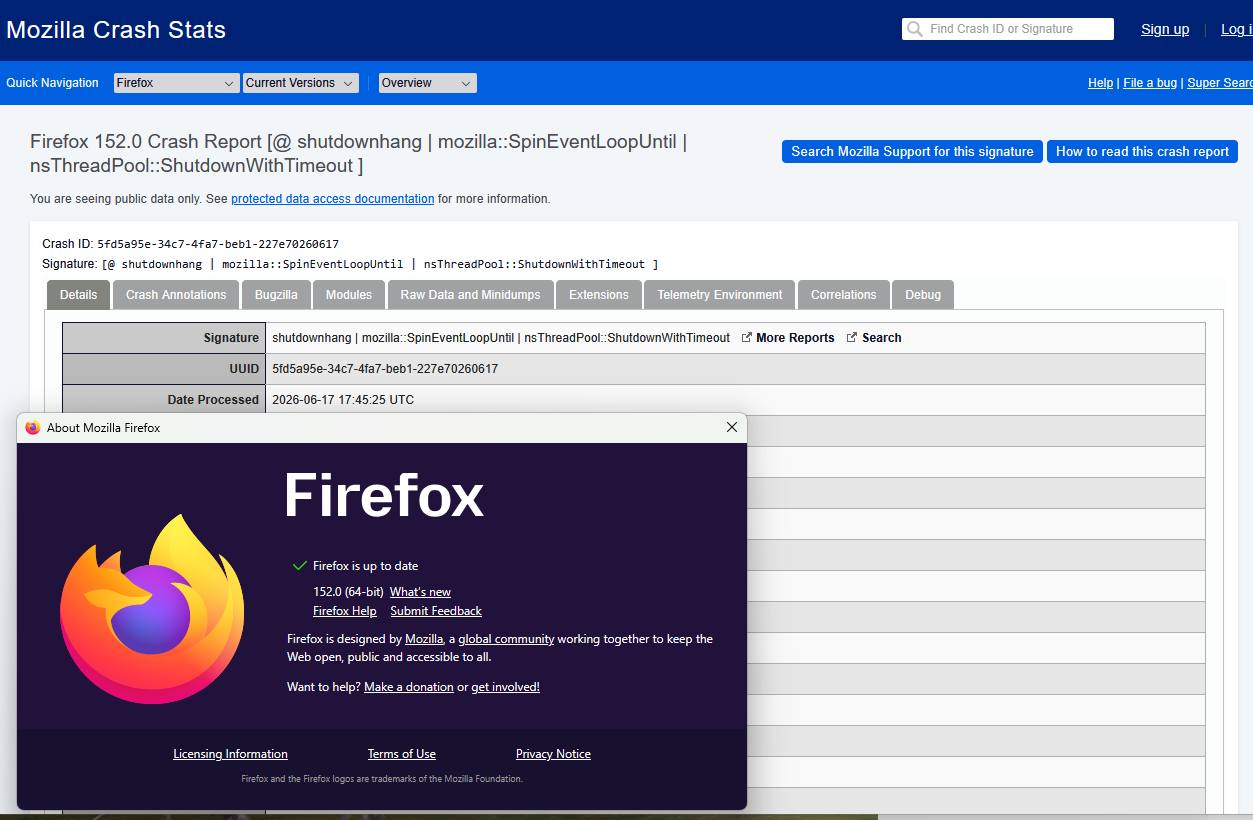
That's submitted correctly, thanks: crash-stats.mozilla.org/report/index/5fd5a95e-34c7-4fa7-beb1-227e70260617
There are several investigations in bugzilla.mozilla.org/1866944 but no single reason. (There was a fix for some notifications, and tab pinning that fell into this bucket too, but now there are mainly some printer–related slowdowns and cryptography issues mentioned.)
According to bugzilla.mozilla.org/1866944 as mentioned by @jbr
And based on your crash stats, it looks like you are using a preview/testing version of Windows 11 (Insider Preview Build 26200).
A few questions to help us understand what happened:
- Did this issue start suddenly after a recent Windows update?
- Have you recently tried to update Windows, and it failed or got stuck?
If the answer is yes
- Check Windows Update and make sure there are no pending or stuck updates that need to be completed.
- You may need to check and repair Windows files.