


Windows 10 reached EOS (end of support) on October 14, 2025. If you are on Windows 10, see this article.

Search Support

Avoid support scams. We will never ask you to call or text a phone number or share personal information. Please report suspicious activity using the “Report Abuse” option.

കൂടുതലറിയുക

High GPU usage on Google Search AI Overviews - Firefox 149.0.2 (macOS) - Chrome is fine

  • 1 മറുപടി
  • 1 has this problem
  • 21 കാഴ്ചകൾ
  • Last reply by Agent virtuel
  • Open

Hello,

I am reporting a performance issue specifically related to Google Search's AI features (AI Overviews) in Firefox 149.0.2 on macOS.

The Issue: When an AI-generated summary appears in Google Search results, GPU usage spikes significantly, reaching up to 212%. This causes the laptop to overheat and triggers high fan speeds.

Critical Comparison:

Firefox 149.0.2: Extreme GPU load and performance degradation when rendering Google AI elements.

Google Chrome 147.0.7727.56: Works perfectly with normal GPU usage under the same conditions.

Tested on two different MacBooks: MacBook Pro (A1502), 16GB RAM, i7 (2015) — OS: macOS Monterey. MacBook Pro (MMQX3), 64GB RAM, M1 Max (2021) — OS: macOS Sequoia (15.x/Tahoe).
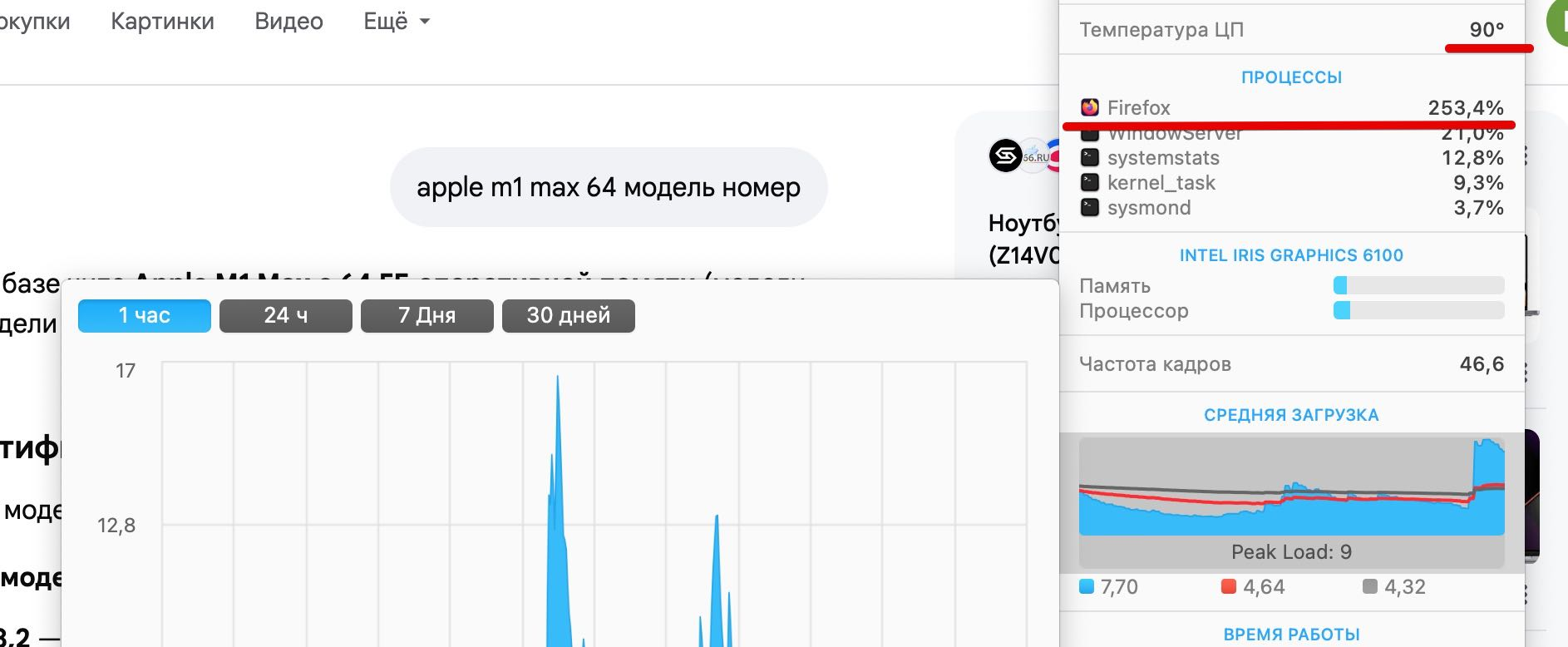

Hello, I am reporting a performance issue specifically related to Google Search's AI features (AI Overviews) in Firefox 149.0.2 on macOS. The Issue: When an AI-generated summary appears in Google Search results, GPU usage spikes significantly, reaching up to 212%. This causes the laptop to overheat and triggers high fan speeds. Critical Comparison: Firefox 149.0.2: Extreme GPU load and performance degradation when rendering Google AI elements. Google Chrome 147.0.7727.56: Works perfectly with normal GPU usage under the same conditions. Tested on two different MacBooks: MacBook Pro (A1502), 16GB RAM, i7 (2015) — OS: macOS Monterey. MacBook Pro (MMQX3), 64GB RAM, M1 Max (2021) — OS: macOS Sequoia (15.x/Tahoe).
Attached screenshots

എല്ലാ മറുപടികളും (1)

Hello

Apparently, a similar subject https://bugzilla.mozilla.org/show_bug.cgi?id=2032772

For information, you can test, add custom search engines in Firefox https://support.mozilla.org/en-US/kb/add-custom-search-engine-firefox

4. In the URL with %s in place of the search term field, copy & paste the URL of the custom search engine.

https://www.google.com/search?udm=14&q=%s
Ask a question

You must log in to your account to reply to posts. Please start a new question, if you do not have an account yet.