


Windows 10 reached EOS (end of support) on October 14, 2025. If you are on Windows 10, see this article.

Search Support

Avoid support scams. We will never ask you to call or text a phone number or share personal information. Please report suspicious activity using the “Report Abuse” option.

കൂടുതലറിയുക
Solved Archived

Thunderbird displaying images problem

damjan5

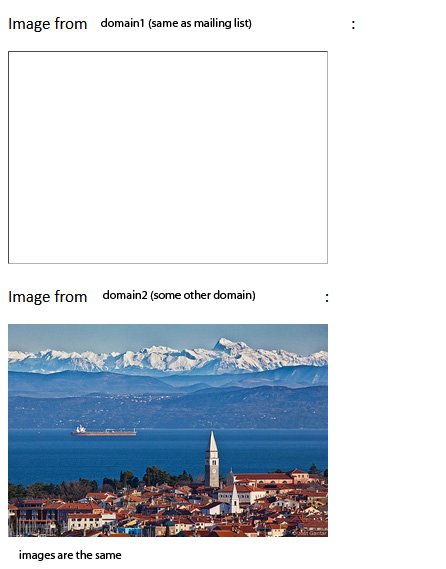
Hello, I've come across a rather strange problem. I have a phplist mailing list (on domain1). When sending emails, I usually also add an image (as a link to the image). Since the beginning of June, however, I've noticed that Thunderbird doesn't display the images added in this way. Instead of the image, it displays an empty frame (a completely empty frame without any tags). Even if "Allow remote content in messages" is checked in the settings. Other email clients (outlook, gmail, roundcube) have no problems and display images without any problems. However, if I put the image on another domain (domain2) and put a link to this image in the email, Thunderbird also displays it. So: it doesn't display the image from domain1, where I have the mailing list, but it displays the same image from domain2 (in the same email from the same mailing list from domain1). Is it possible that Thunderbird is blocking the display of images from a certain domain?
Hello, I've come across a rather strange problem. I have a phplist mailing list (on domain1). When sending emails, I usually also add an image (as a link to the image). Since the beginning of June, however, I've noticed that Thunderbird doesn't display the images added in this way. Instead of the image, it displays an empty frame (a completely empty frame without any tags). Even if "Allow remote content in messages" is checked in the settings. Other email clients (outlook, gmail, roundcube) have no problems and display images without any problems. However, if I put the image on another domain (domain2) and put a link to this image in the email, Thunderbird also displays it. So: it doesn't display the image from domain1, where I have the mailing list, but it displays the same image from domain2 (in the same email from the same mailing list from domain1). Is it possible that Thunderbird is blocking the display of images from a certain domain?
Attached screenshots

എല്ലാ മറുപടികളും (1)

Chosen Solution

Problem solved: the ssl chain file was not installed for domain1. Other email clients apparently don't pay attention to this, but Thunderbird wants everything set up as it should be.