


Firefox (for ARM) Browser on Windows (for ARM) Showing Extra Blank Pages on Taskbar Preview

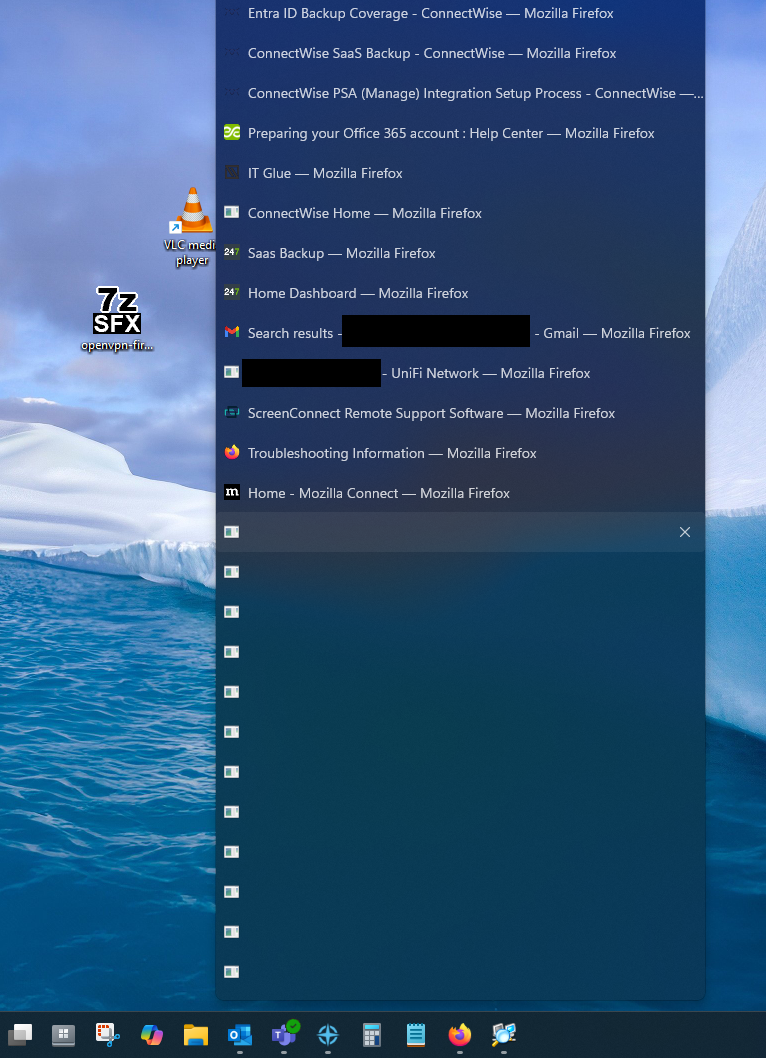
I am on Windows for ARM devices and running Firefox 142.0.1 (aarch64). When I use Firefox for any extended period of time, I'll start to notice these blank icon pages accumulating when I hover over the icon on my taskbar. Nothing happens if I hover or click on any of them and clicking the 'x' on the right will not close them. They stay even after I close the browser and until I restart the computer. Has anyone seen this issue and know of anything that could fix this? I hesitate to reinstall right now, as I'm not signed into a Firefox account on this browser (this is my work computer). I appreciate any and all replies. Thank you!
Okulungisiwe ngu rrfhxxqdsp
All Replies (1)

once you just take temporary profile backup by Pressing Win+R, then type "%APPDATA%\Mozilla\Firefox\Profiles\" and copy the whole profile folder somewhere safe.
then you can go to Settings > General > Performance. Uncheck “Use recommended performance settings” and then uncheck “Use hardware acceleration when available”. then restart firefox
or simple open Task Manager (Ctrl+Shift+Esc) and end all Firefox entries.