


Black thumbtacks suddenly appear on all shortcuts

Why are these showing up now? They were never there before. Is there a way to hide them or make them disappear? They are ugly, distracting to look at and unnecessary. I tried one about:config solution, but it did not work. Please fix this. See screenshot. The black tacks should not be visible, but now they are.
Why are these showing up now? They were never there before. Is there a way to hide them or make them disappear? They are ugly, distracting to look at and unnecessary. I tried one about:config solution, but it did not work. Please fix this. See screenshot. The black tacks should not be visible, but now they are.

All Replies (1)
Hello
For information purposes, take a look at https://connect.mozilla.org/t5/discussions/home-page-icon-rows-too-spread-from-each-other/m-p/85732/highlight/true#M32753
- Hypothesis about:config browser.newtabpage.activity-stream.newtabShortcuts.refresh
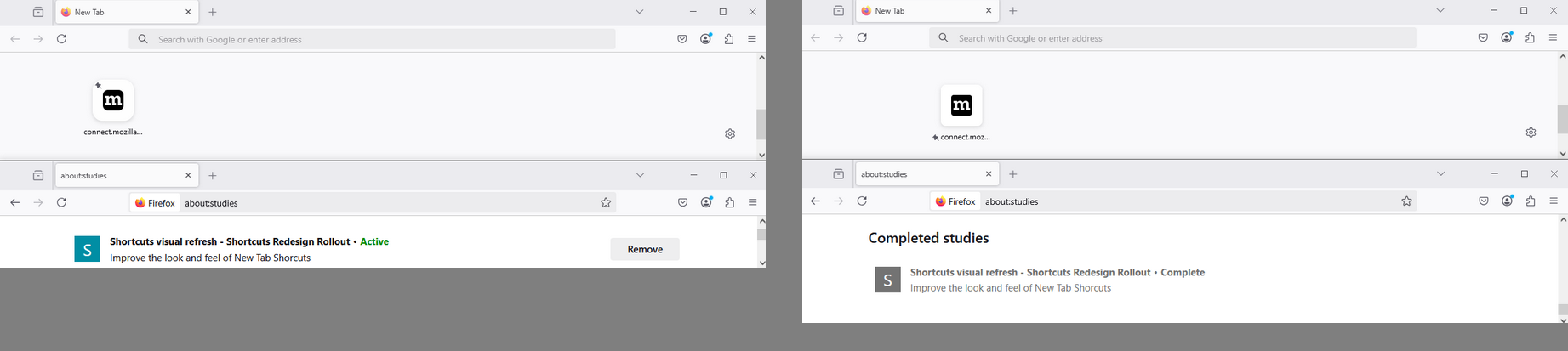
- Is it about the subject, Shortcuts visual refresh - Shortcuts Redesign Rollout
Type about:studies into your address bar to see a list of your studies. Click the Remove button next to the study you want to opt out of.
Okulungisiwe ngu Agent virtuel