


Thunderbird failed to find profile

I am running Thunderbird vers 127 (I think) on Win 10. When I try to start it all I get is the error -
"A newer version of Thunderbird may have made changes to your profile which are no longer compatible with this older version. Use this profile only with that newer version, or create a new profile for this installation of Thunderbird. Creating a new profile requires setting up your accounts, calendars and add-ons again..".
How do I get back to my profile? All was fine until May 7th when I went on hols but but this happened when I tried to restart on 19th May (so don't think it has updated to vers 128)
Any help much appreciated as this is a complicated profile and would take an age to re-build. (I have got a coy of the relevant profile as a backup)
Isisombulu esikhethiweyo
re:"A newer version of Thunderbird may have made changes to your profile which are no longer compatible with this older version.
That means you were previously using a newer version than the one you have currently got installed.
Try this:
I'm assuming you are using a Windows OS and have used a Thunderbird installation from this link so profile is in the default location. https://www.thunderbird.net/en-US/thunderbird/all/
- Exit Thunderbird
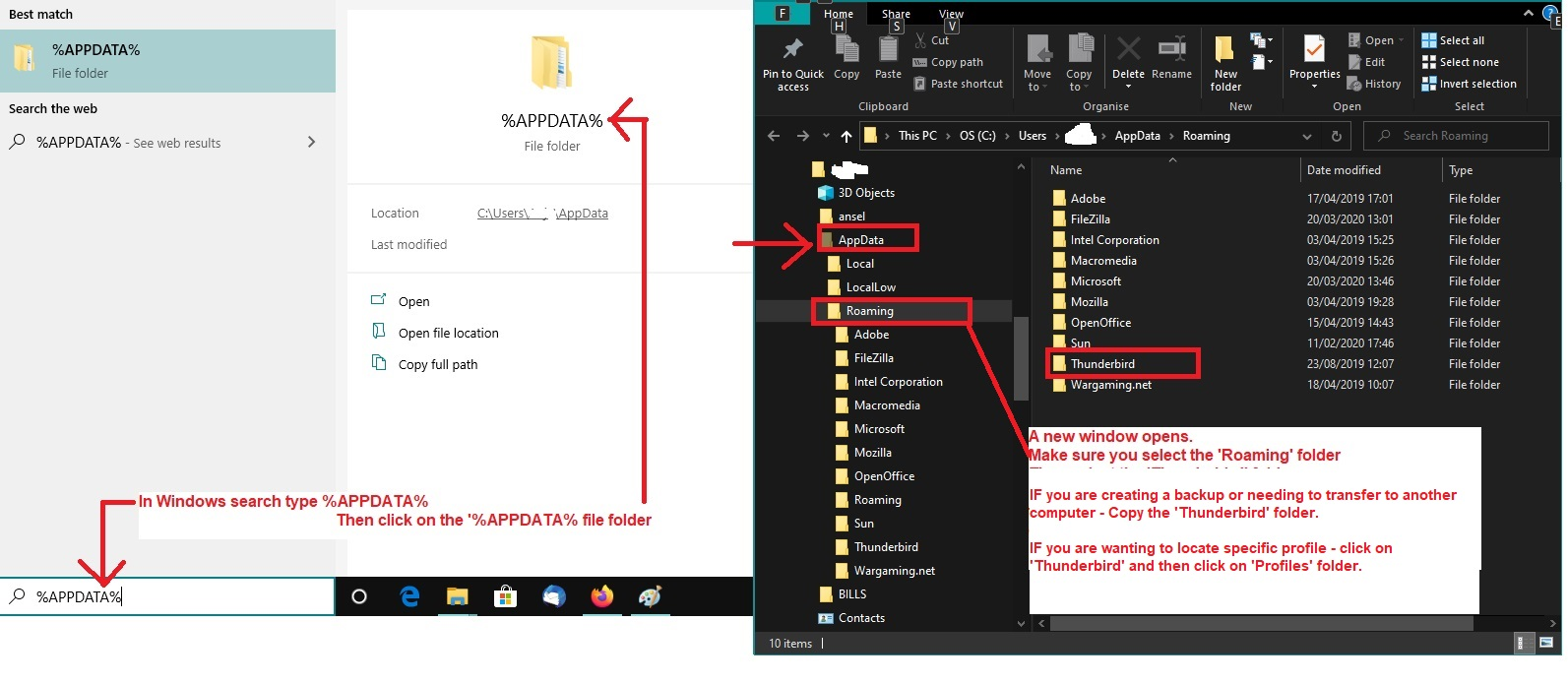
- In windows search bottom left of screen type: %Appdata% - see image as guide
- Select the %Appdata% file folder option
- Select 'Roaming'
- Select 'Thunderbird'
- Select the original profile name
- Look for this file and delete it : 'compatibility.ini'
- Start Thunderbird.
All Replies (3)
Woops, just realised it must have attempted to instal vers 128; all program files & folders are dated 13 or 16 May, so now what?!!!
Terry
Isisombululo esiKhethiweyo
re:"A newer version of Thunderbird may have made changes to your profile which are no longer compatible with this older version.
That means you were previously using a newer version than the one you have currently got installed.
Try this:
I'm assuming you are using a Windows OS and have used a Thunderbird installation from this link so profile is in the default location. https://www.thunderbird.net/en-US/thunderbird/all/
- Exit Thunderbird
- In windows search bottom left of screen type: %Appdata% - see image as guide
- Select the %Appdata% file folder option
- Select 'Roaming'
- Select 'Thunderbird'
- Select the original profile name
- Look for this file and delete it : 'compatibility.ini'
- Start Thunderbird.
What does your update history show, found at Help > Troubleshooting Information > Show Update History?