


how do I delete an email address from the dropdown that appears after I type the first letter of the recipiants address in the To: bar.
When I open compose and type the first letter of the recipients address in the To: bar a dropdown appears with a listing of the email addresses I have sent messages to in the past as well as addresses of my contacts list. How do I delete an address from this dropdown?
Tất cả các câu trả lời (8)

- Click your 'Alt' key
- A menu bar will appear at the top of your FireFox browser.
- 'Click 'Tools'
- 'Clear Recent History'
- Select 'Details'
- Select Forum & Search History
- Time range to clear =Everything
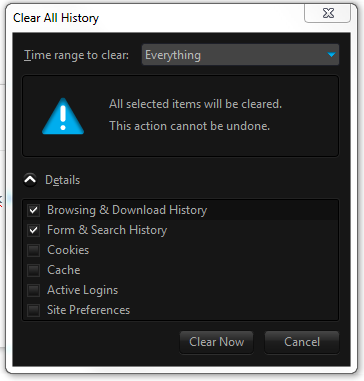
Được chỉnh sửa bởi ThereThayGuy vào
- Click the (empty) input field on the web page to open the drop down list
- Highlight an entry in the drop down list
- Press the Delete key (on Mac: Shift+Delete) to remove it.
I do not want to delete all history as suggested in the first reply but rather just delete one address at a time. Highlighting an entry does not delete the email address. My preference is to delete only the email addresses I want, one at a time.
Did you press the Delete key on a highlighted entry in the drop down list?
Don't click an entry with the mouse, just highlight and press Delete.
Được chỉnh sửa bởi cor-el vào
By highlighting I presume you mean just to hover the mouse over the email address and then click delete. I did not click the mouse once it hovered over the address and it was highlighted. Sorry for my ignorance but I am a Senior who is not that computer literate.
Quote: By highlighting I presume you mean just to hover the mouse over the email address and then click delete.
Yes, that should remove that entry.
If you keep having problems then try this extension:
- Form History Control: https://addons.mozilla.org/firefox/addon/form-history-control/
I installed the add on but no luck. Guess I will just live with it. I do appreciate everyone's help!
Start Firefox in Use Troubleshoot Mode in Firefox to check if one of the extensions or if hardware acceleration is causing the problem (switch to the DEFAULT theme: Firefox (Tools) > Add-ons > Appearance/Themes).
- Don't make any changes on the Safe mode start window.
- https://support.mozilla.com/kb/Safe+Mode