


I want to go back to the previous version of firefox - NOW!!!!!

The update wiped out my tool bar and bookmarks - I want them back!!!!!!
The update wiped out my tool bar and bookmarks - I want them back!!!!!!
Tất cả các câu trả lời (1)

Try selecting the toolbars you want in the Firefox 4 menu by clicking the orange Firefox icon at the top left corner, then hold the mouse over the Options menu item, then select the toolbars you want:
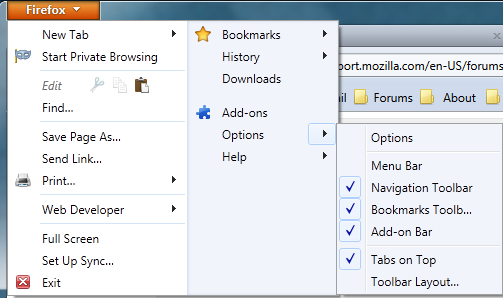
If you check the Menu bar, then the orange Firefox button will be gone and you will have the traditional menu (File, Edit, View, History, Bookmarks, Tools, Help). To temporarily show the Menu bar, press the alt key on the keyboard.
If you still want to downgrade to Firefox 3.6 you can get it here: http://www.mozilla.com/firefox/all-older.html
See Install an older version of Firefox for more information.