


Windows 10 reached EOS (end of support) on October 14, 2025. If you are on Windows 10, see this article.

Tìm kiếm hỗ trợ

Tránh các lừa đảo về hỗ trợ. Chúng tôi sẽ không bao giờ yêu cầu bạn gọi hoặc nhắn tin đến số điện thoại hoặc chia sẻ thông tin cá nhân. Vui lòng báo cáo hoạt động đáng ngờ bằng cách sử dụng tùy chọn "Báo cáo lạm dụng".

Tìm hiểu thêm
Đã giải quyết

Firefox Printing Issue – Landscape Labels Printing in Portrait Orientation

Jegatheesh M

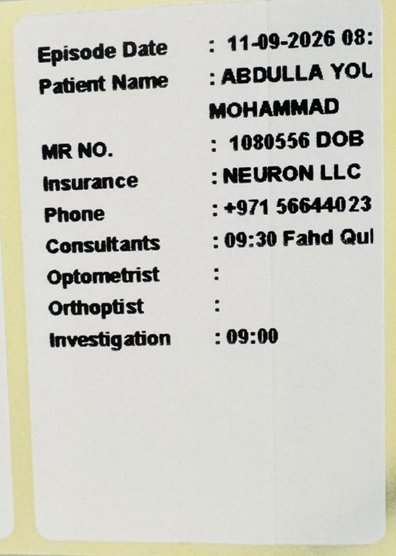
Dear Firefox Team, We are facing a printing issue with the latest version of Mozilla Firefox and would appreciate your help in resolving it. Our web-based healthcare application generates patient labels containing barcodes and patient information. These labels are designed to print in landscape orientation, and the Firefox print preview displays them correctly. However, when printing directly from Firefox, the labels are printed in portrait orientation, causing alignment and formatting issues. This issue was not present in an earlier version of Firefox, and printing was working correctly before. Unfortunately, we do not remember which Firefox version we were using at that time. We have observed the following: The print preview displays the label correctly in landscape orientation. Direct printing from Firefox prints the label in portrait orientation. Manually selecting Landscape in the Firefox print settings resolves the issue. The same application prints correctly in Microsoft Edge and Google Chrome without any manual changes. Saving the output as a PDF from Firefox preserves the correct landscape orientation. Since the issue appears to have started after a Firefox update and occurs only when printing directly, could you please investigate whether this is related to a change in Firefox's print handling or its interaction with printer settings? We would appreciate any recommended configuration or fix that would allow Firefox to retain the landscape orientation when printing directly. Thank you for your support. We look forward to your guidance.
Dear Firefox Team, We are facing a printing issue with the latest version of Mozilla Firefox and would appreciate your help in resolving it. Our web-based healthcare application generates patient labels containing barcodes and patient information. These labels are designed to print in landscape orientation, and the Firefox print preview displays them correctly. However, when printing directly from Firefox, the labels are printed in portrait orientation, causing alignment and formatting issues. This issue was not present in an earlier version of Firefox, and printing was working correctly before. Unfortunately, we do not remember which Firefox version we were using at that time. We have observed the following: The print preview displays the label correctly in landscape orientation. Direct printing from Firefox prints the label in portrait orientation. Manually selecting Landscape in the Firefox print settings resolves the issue. The same application prints correctly in Microsoft Edge and Google Chrome without any manual changes. Saving the output as a PDF from Firefox preserves the correct landscape orientation. Since the issue appears to have started after a Firefox update and occurs only when printing directly, could you please investigate whether this is related to a change in Firefox's print handling or its interaction with printer settings? We would appreciate any recommended configuration or fix that would allow Firefox to retain the landscape orientation when printing directly. Thank you for your support. We look forward to your guidance.
Đính kèm ảnh chụp màn hình

Tất cả các câu trả lời (1)

Giải pháp được chọn

Created another question. Please remove this question. Thanks.

Đặt một câu hỏi

Bạn phải đăng nhập vào tài khoản của bạn để trả lời bài viết. Vui lòng bắt đầu một câu hỏi mới, nếu bạn chưa có tài khoản.