


Windows 10 reached EOS (end of support) on October 14, 2025. If you are on Windows 10, see this article.

Tìm kiếm hỗ trợ

Tránh các lừa đảo về hỗ trợ. Chúng tôi sẽ không bao giờ yêu cầu bạn gọi hoặc nhắn tin đến số điện thoại hoặc chia sẻ thông tin cá nhân. Vui lòng báo cáo hoạt động đáng ngờ bằng cách sử dụng tùy chọn "Báo cáo lạm dụng".

Tìm hiểu thêm
Mở

Mozilla VPN 2.40 Update results in Windows bad image report

Mike Schmieg

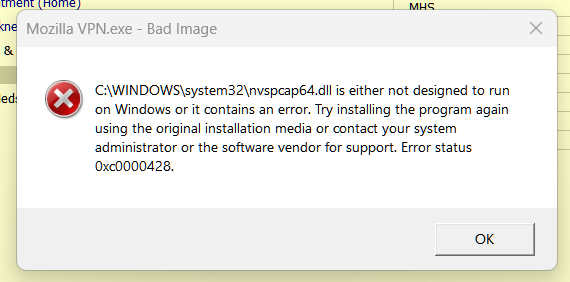
I just updated my Mozilla VPN to version 2.40. Now, whenever the vpn is started, Windows reports that nvspcap64.dll is not designed to run on Windows or it contains an error. Error status 0xc0000428. I have tried uninstalling and reinstalling to no avail. I restored the nvspcap64.dll from a backup which didn't work either. I have attached a screenshot of the message.

Repeated clicking of the "OK" button on the message will eventually allow the vpn to open, but I'm not sure if it is working correctly.

Can this be fixed?
https://assets-prod.sumo.prod.webservices.mozgcp.net/media/uploads/images/2026-10-21-07-04-39-25a98d.png

I just updated my Mozilla VPN to version 2.40. Now, whenever the vpn is started, Windows reports that nvspcap64.dll is not designed to run on Windows or it contains an error. Error status 0xc0000428. I have tried uninstalling and reinstalling to no avail. I restored the nvspcap64.dll from a backup which didn't work either. I have attached a screenshot of the message. Repeated clicking of the "OK" button on the message will eventually allow the vpn to open, but I'm not sure if it is working correctly. Can this be fixed? https://assets-prod.sumo.prod.webservices.mozgcp.net/media/uploads/images/2026-10-21-07-04-39-25a98d.png
Đính kèm ảnh chụp màn hình

Tất cả các câu trả lời (1)

Hi,

Mozilla VPN is one of Mozilla's premium products. In order to get premium support from a dedicated agent, please submit your question with your Mozilla VPN app by going to Settings > Help > Contact Support. Alternatively, you can sign in to the Mozilla account connected to your subscription here (if not already) and then use this link.

The Mozilla VPN form link can also be found on top at Ask a Question > Mozilla VPN. Make sure you are using the Mozilla Account that has the Mozilla VPN subscription.

Đặt một câu hỏi

Bạn phải đăng nhập vào tài khoản của bạn để trả lời bài viết. Vui lòng bắt đầu một câu hỏi mới, nếu bạn chưa có tài khoản.