


Windows 10 reached EOS (end of support) on October 14, 2025. If you are on Windows 10, see this article.

Tìm kiếm hỗ trợ

Tránh các lừa đảo về hỗ trợ. Chúng tôi sẽ không bao giờ yêu cầu bạn gọi hoặc nhắn tin đến số điện thoại hoặc chia sẻ thông tin cá nhân. Vui lòng báo cáo hoạt động đáng ngờ bằng cách sử dụng tùy chọn "Báo cáo lạm dụng".

Tìm hiểu thêm
Mở

Keybind Feature Suggestion

Kvars

Not a bug report, but more so a feature suggestion for extra keybinds. In case this isn't the right place for a feature suggestion, please excuse me, since search results only yielded the Firefox suggestions thingy. Some browsers like Opera have a keyboard shortcut assigned to selecting the website URL through Cmd+E. This is pretty convenient for those who access most of the browser controls using a keyboard rather than a mouse or touchpad. At the moment you can use "Focus the Search Bar" by Cmd+K and Esc twice to have the URL selected but it's not really ideal. Thanks for the continued support and making Firefox a great browser to use.

Not a bug report, but more so a feature suggestion for extra keybinds. In case this isn't the right place for a feature suggestion, please excuse me, since search results only yielded the Firefox suggestions thingy. Some browsers like Opera have a keyboard shortcut assigned to selecting the website URL through Cmd+E. This is pretty convenient for those who access most of the browser controls using a keyboard rather than a mouse or touchpad. At the moment you can use "Focus the Search Bar" by Cmd+K and Esc twice to have the URL selected but it's not really ideal. Thanks for the continued support and making Firefox a great browser to use.

Tất cả các câu trả lời (1)

What is the actual question?

This is the list of shortcuts: Keyboard shortcuts - Perform common Firefox tasks quickly

This is the customization options: Customize keyboard shortcuts in Firefox

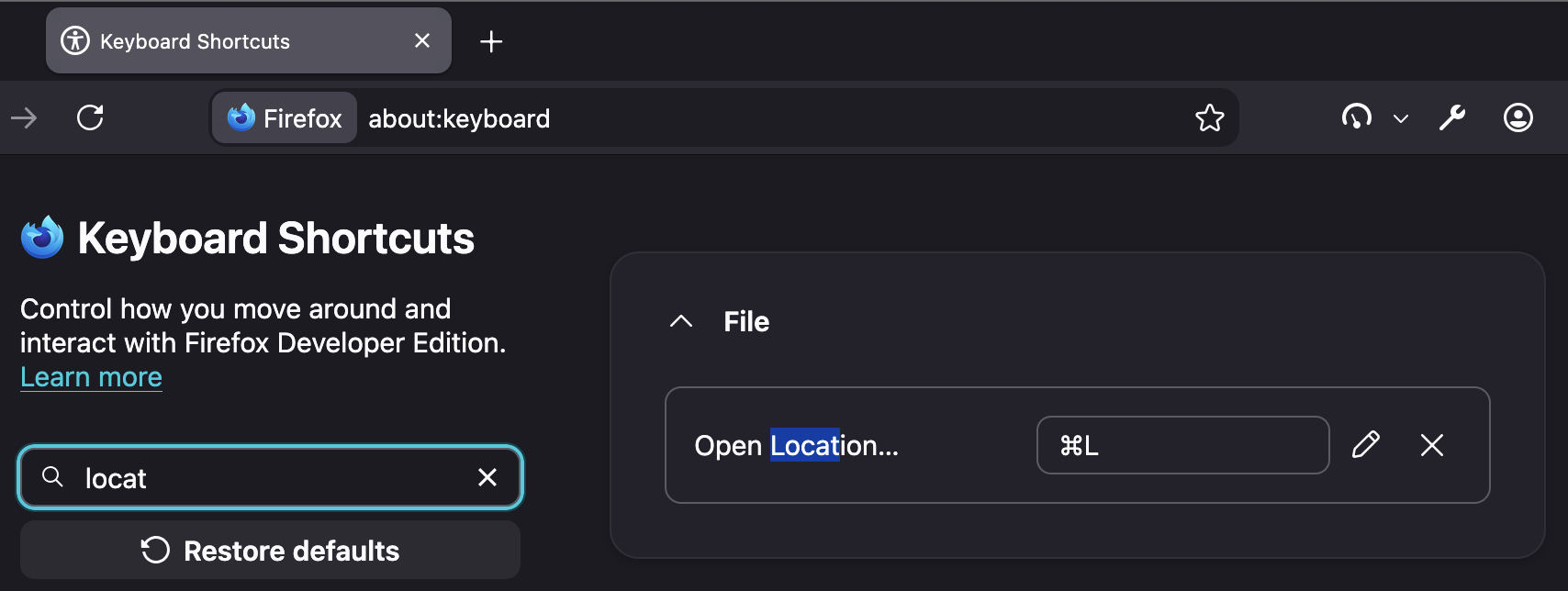
I think you're just looking for the standard Cmd + L … however if you want to change it to something else, you can re–map that key combo:
Đặt một câu hỏi

Bạn phải đăng nhập vào tài khoản của bạn để trả lời bài viết. Vui lòng bắt đầu một câu hỏi mới, nếu bạn chưa có tài khoản.