


Đã giải quyết
Removal of "Hide sidebar" button in the top left

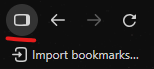
With an update to version 157.0, firefox seems to have introduced more sidebar settings. One of the features introduced is also a "Hide sidebar" button in the top left of the screen, right next to the go one page back/forward buttons. This is throwing off my muscle memory and I know that I will not be needing it so I am wondering if there is some way to get rid of it.
With an update to version 157.0, firefox seems to have introduced more sidebar settings. One of the features introduced is also a "Hide sidebar" button in the top left of the screen, right next to the go one page back/forward buttons. This is throwing off my muscle memory and I know that I will not be needing it so I am wondering if there is some way to get rid of it.
Tất cả các câu trả lời (1)
Giải pháp được chọn
Right click. "Remove from toolbar"