

Windows 10 reached EOS (end of support) on October 14, 2025. If you are on Windows 10, see this article.

Tìm kiếm hỗ trợ

Tránh các lừa đảo về hỗ trợ. Chúng tôi sẽ không bao giờ yêu cầu bạn gọi hoặc nhắn tin đến số điện thoại hoặc chia sẻ thông tin cá nhân. Vui lòng báo cáo hoạt động đáng ngờ bằng cách sử dụng tùy chọn "Báo cáo lạm dụng".

Tìm hiểu thêm
Đã giải quyết

How to create a Mailing List in Thunderbird v156.0.1

Supertech

I'm still learning Thunderbird after years of using/supporting Outlook. So far, so good. Today I wanted to create a Mailing List. I found a support article on this dated 2/13/15. It said:

Create a mailing list

   Open the Address Book.
   Select File > New > 'Mailing List'.
   Enter a suitable name for the mailing list.

In version 156.0.1 this doesn't seem correct any more. I've uploaded an image of the menu I get. There doesn't seem to be any Mailing List option. 2015 was a long time ago, so I'm guessing this Article is WAY out of date and Mailing List creation has changed. Any guidance?
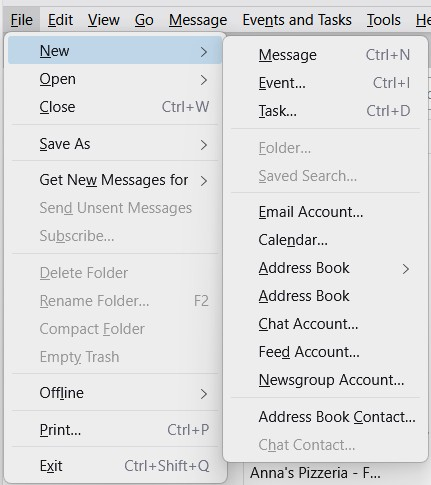
I'm still learning Thunderbird after years of using/supporting Outlook. So far, so good. Today I wanted to create a '''Mailing List'''. I found a support article on this dated 2/13/15. It said: '''Create a mailing list''' Open the Address Book. Select File > New > ''''''Mailing List''''''. Enter a suitable name for the mailing list. In version 156.0.1 this doesn't seem correct any more. I've uploaded an image of the menu I get. There doesn't seem to be any Mailing List option. 2015 was a long time ago, so I'm guessing this Article is WAY out of date and Mailing List creation has changed. Any guidance?
Đính kèm ảnh chụp màn hình

Tất cả các câu trả lời (2)

Giải pháp được chọn

You are referring to https://support.mozilla.org/en-US/kb/how-create-and-use-mailing-lists-thunderbird

You are correct, the article was outdated. I have reviewed and approved the changes which bring it up to date.

Thanks for bringing this to our attention.

Thanks for the stunningly fast reply. This does, indeed, solve the issue. Thanks!

Đặt một câu hỏi

Bạn phải đăng nhập vào tài khoản của bạn để trả lời bài viết. Vui lòng bắt đầu một câu hỏi mới, nếu bạn chưa có tài khoản.