Can’t close tabs
Trying to close a bunch of open tabs
Tất cả các câu trả lời (3)
Hi Michael,
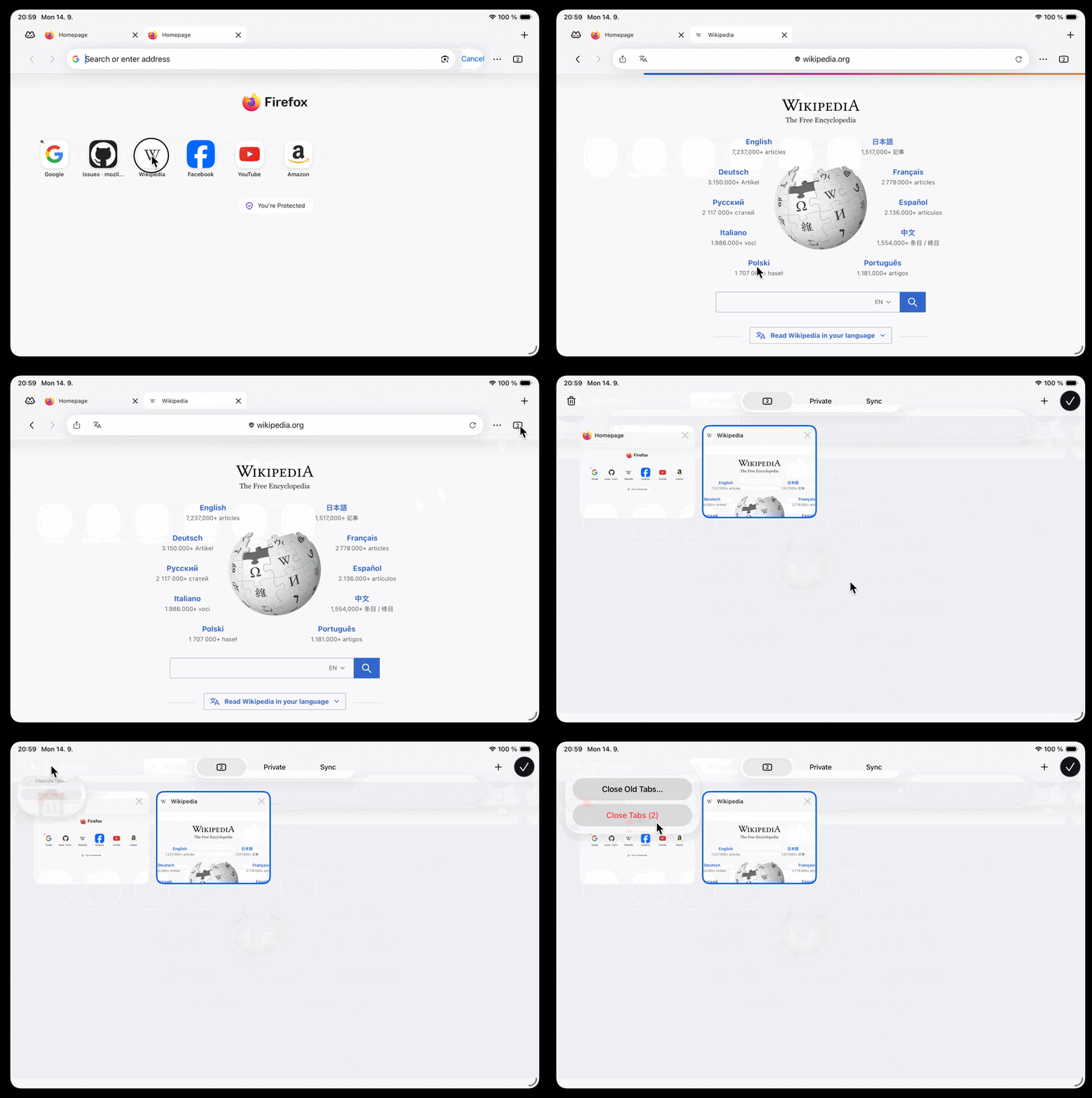
If you're on Firefox for iOS, from the tabs tray, you can click on the trash icon at the bottom left of the screen and then choose between closing only old tabs or to close all tabs. Unfortunately, you can't select muliple tabs at the same time to close them so it's either one by one or you close everything at once.
THanks Kiki... But on my ipad screen, when I launch Firefox I see the tabs bar (with a bunch of tabs), the address bar, but no trash icon anywhere. When I click on the 3 dots at top right (at end of address bar), I get choice to click on bookmarks, history, downloads, and passwords, a sync option, and the settings icon. Again, no trash icon anywhere... and no other place to close any or all tabs. I also don't see how to add icons for home, print, etc., as on the desktop version. And there's no bar with my saved bookmarks, even though I've synced with the desktop. I must be missing something!!
The toolbars are not customizable on mobile like desktop is, so the bookmarks or print functions are all in the "•••" site menu. The tab management however, is under the tab overview button: