


Why are you censoring websites?

This morning I was able to access the website of: https://www.alexander-wallasch.de/ Now, ONE HOUR later I no longer can. You are doing this not for the first time, it happens regularly with websites that do not conform to what you would consider Mainstream! THis is not the sites fault. YOU ARE CENSORING ON PURPOSE: IF YOU WOULD NOT; YOU COULD SIMPLY ADD A BUTTON for every site THAT ALLOWS USERS TO OVERRIDE YOUR OPINIONS: WHY IS THAT NOT HAPPENBING? Why can the user not override your decision? Has anyone ever asked you for "help" like that?
Tất cả các câu trả lời (22)
The browser is not censoring anything, mostly because it doesn't really know what you're visiting. That site linked in the post seems to work just fine. If it doesn't on your end though, you're looking at a networking/infrastructure issue. If you can attach screenshots of any errors you get, somebody might be able to help further. But basically the troubleshooting steps start at support.mozilla.org/en-US/kb/firefox-does-not-work-common-fixes#w_websites-wont-load
Just confirming the above by jbr.
Working fine here in the UK Fx 153.0.4 and Win 11, even with cookies disabled at my end.
Thank you Yes, it may be simply the locality. It worked an hour ago, now it does not. And yes the so-called security software is garbage everywhere. But my question was: Why does Firefox not allow me to override their decision at my own risk? I never asked for their protection, I was looking for a browser...
That is something that you will need to pick up with the provider of that security software. Firefox can open that site perfectly fine.
In that case, why does Ff allow it, and in particular: There is only one link on that page and it leads to Ff. And it still does not answer my question, why can I not override this?
And it clearly states: "The page you are trying to view cannot be shown because the authenticity of the received data could not be verified." Well an hour before it was able to do that just fine. And this is by far not the first time this nonsense happens! Why is it not possible to even see, who does that? Who prevents me from using my computer the way I choose to? And why did Mozilla turn over that power to some anonymus?
Firefox does allow this page to open in Firefox, but it may be the case that the security software that you are using may be blocking it. You may have to contact that software support team about creating an exception for the site that you are trying to view.
Once again: nonsense. I am siomply using Win11 nothing else, AND The page opened without a problem one hour ago. An Ff does NOT allow me to open that page, when I try to open it! No one else is mentioned !
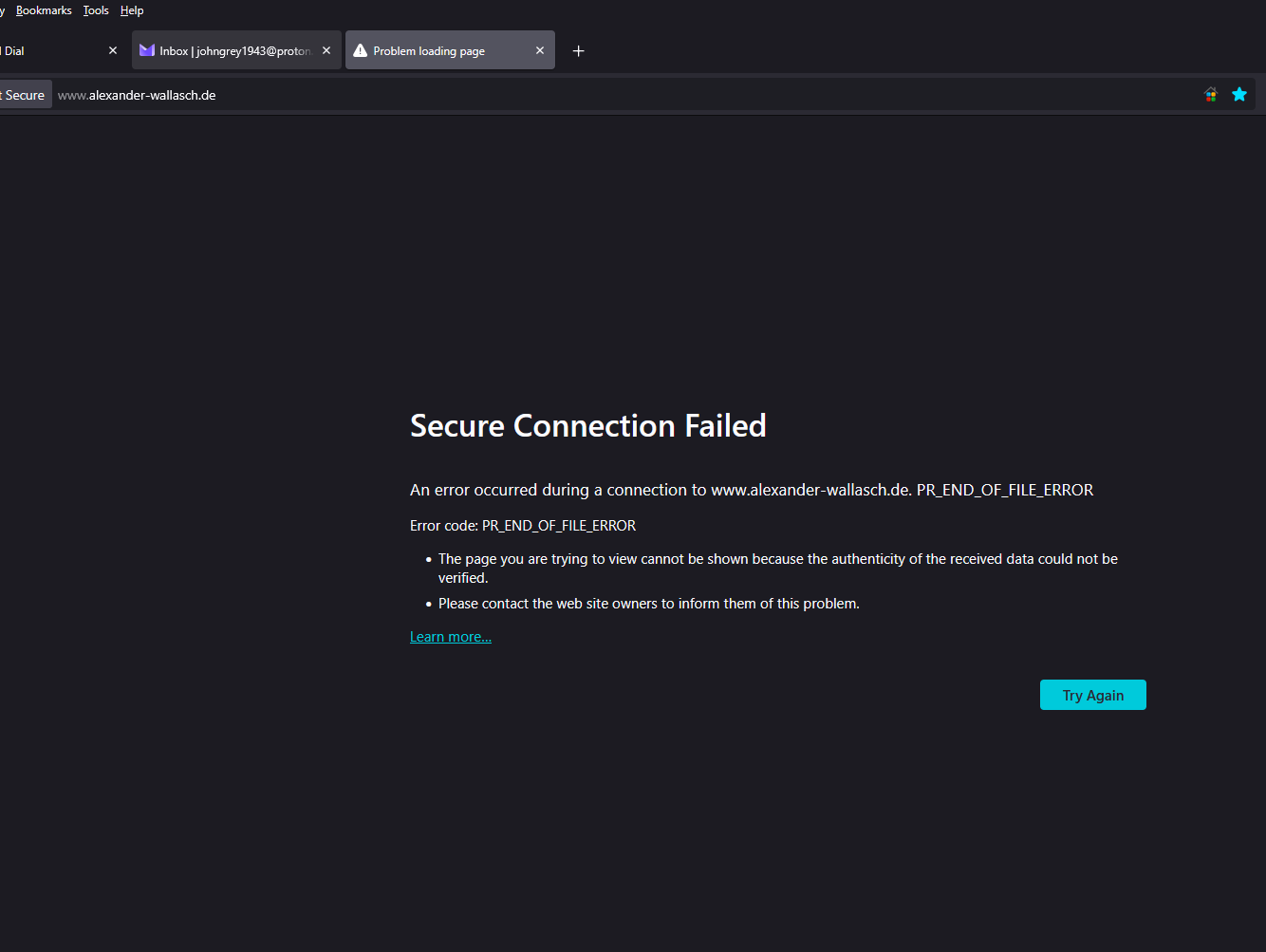
It would be useful if you could share a screenshot of the error that you are getting when you try to view that page.
Here you are ...
The Link on the page leads here: https://support.mozilla.org/en-US/kb/secure-connection-failed-firefox-did-not-connect?as=u&utm_source=inproduct
Are you using a VPN or DNS over HTTPS in Firefox?
Yes always... let me remind you: IT WORKED AN HOUR EARLIER1
As an experiment, can you see if turning off either the VPN or DNS over HTTPS means you can access that website.
Yes, it works fine with VPN, it also works fine with VPN, as it is supposed to. But sometimes Ff interferes when the VPN is on. And not ust on that webpage
Does it work fine without the VPN?
What about DNS over HTTPS?
How I check DNS over HTTPS?
Enter about:settings#privacy in the address bar and scroll down a bit to see the DNS over HTTPS settings.
The error code literally means none of the encoding provided by the other party is comprehensible to Firefox. So it doesn't even receive a single bit of the page content, it fails before that. (=i.e. there's nothing to "proceed" to, risk or no risk.)
Given the server from where we look does provide the cipher suites just fine, it must be some "middlebox" on the line from the server to you. It can be a router/modem trying to show its internal page instead. It might be third party security software injecting ad content and mangling the connection. It can be just some outage on the cluster assigned to serve you, and its error state gets transferred in unfortunate ways like this empty/invalid response.
Using DNS–over–HTTPS or VPN places you in different geographical region for routing purposes — so using these, or not, impacts how and where from you're served a lot of datacenter traffic. So try to e.g. switch the provider/network in settings to get a different route to the content, maybe that one will be able to serve you better.
I have activated: Don’t enable HTTPS-Only Mod,. and dns over https: Status Off
jbr... I understand. but that does not explain, why it works at 7 and no longer works at 8 with exactly the same hard and software...