


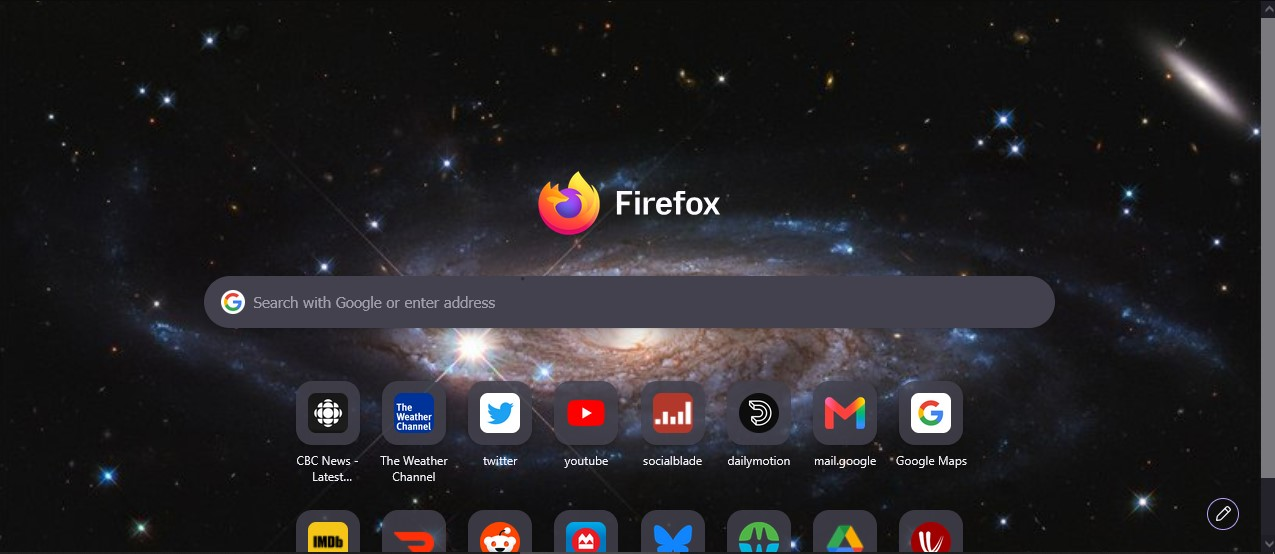
When I click for a new tab, all the shortcuts I have are moved down awkwardly. Can you fix that? That does not seem to be a good choice. Please change.
When I click for a new tab, all the shortcuts I have are moved down awkwardly. Can you fix that? That does not seem to be a good choice. Please change. The attached image shows that everything has moved down and I cannot see the names of the shortcuts. Why did you do this? Please fix that. There was absolutely no reason to do that!
Giải pháp được chọn
Hello
Is it, your question
To see, you can test, browser.newtabpage.activity-stream.nova.enabled
1 - Go to configuration editor https://support.mozilla.org/en-US/kb/about-config-editor-firefox 2 - Enter a search term browser.newtabpage.activity-stream.nova.enabled You can double-click on the preference to set the value to false
https://support.mozilla.org/en-US/questions/1583851
Đọc câu trả lời này trong ngữ cảnh 👍 1Tất cả các câu trả lời (1)
Giải pháp được chọn
Hello
Is it, your question
To see, you can test, browser.newtabpage.activity-stream.nova.enabled
1 - Go to configuration editor https://support.mozilla.org/en-US/kb/about-config-editor-firefox 2 - Enter a search term browser.newtabpage.activity-stream.nova.enabled You can double-click on the preference to set the value to false