


Windows 10 reached EOS (end of support) on October 14, 2025. If you are on Windows 10, see this article.

Tìm kiếm hỗ trợ

Tránh các lừa đảo về hỗ trợ. Chúng tôi sẽ không bao giờ yêu cầu bạn gọi hoặc nhắn tin đến số điện thoại hoặc chia sẻ thông tin cá nhân. Vui lòng báo cáo hoạt động đáng ngờ bằng cách sử dụng tùy chọn "Báo cáo lạm dụng".

Tìm hiểu thêm
Open

blacked contacts menu and lettering

Manas Ronghe đã trả lời
goldeyegold

I tried changing the theme of my browser and I tried disabling all the extensions that I have on my browser but the problem still persists
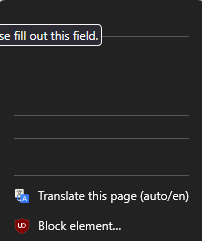
I tried changing the theme of my browser and I tried disabling all the extensions that I have on my browser but the problem still persists
Đính kèm ảnh chụp màn hình

Tất cả các câu trả lời (1)

Hi there!

Changing the theme and disabling extensions is exactly where I would have started, too.

Since those didn't work, it's usually one of two hidden culprits. Try these quick steps:

  • Turn off Hardware Acceleration: Click the Firefox menu button (three lines) -> Settings. In the General panel, scroll down to Performance. Uncheck Use recommended performance settings, and then uncheck Use hardware acceleration when available. Restart Firefox and see if the text clears up. (This fixes a lot of weird visual glitches with graphics cards!)
  • Check Website Dark Mode: If this is happening on a specific site (like Google Contacts), look for a gear icon or settings menu directly on that webpage. The site might have its own built-in dark mode setting that is overriding your browser and messing up the contrast.
Đặt một câu hỏi

Bạn phải đăng nhập vào tài khoản của bạn để trả lời bài viết. Vui lòng bắt đầu một câu hỏi mới, nếu bạn chưa có tài khoản.