


Changing Search engine stays until you change it back

A while back they made an annoying change to the search field and I wondering if there's a setting to get it back to the way it was.
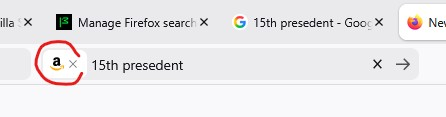
My default search is Google but lets say I want to buy something. I type "garden hose" in the search field and switch the search to Amazon. Nothing happens. It used to go automatically at that point. Now I need to press enter or the arrow next to the search field. Not a big deal but why did they change that?
Next I want to find out about the 15th US president. I open another tab and search for the "15th president" and it goes to Amazon again. I realized I changed my default search engine. It used to be that I could temporarily change the search engine and it would immediately go back to my default.
I think these 2 facts make the current search field much worse than before.
Is there some way to change it back? I looked over the settings but couldn't find anything.
Giải pháp được chọn
Hello
Add the Search bar to your Firefox toolbar https://support.mozilla.org/en-US/kb/add-search-bar-firefox-toolbar
These discussions https://bugzilla.mozilla.org/show_bug.cgi?id=2012951
https://connect.mozilla.org/t5/discussions/update-149-0-made-searching-more-difficult/td-p/120608
https://connect.mozilla.org/t5/discussions/a-frustrating-update-they-ve-changed-the-search-bar-behavior/m-p/123109/highlight/true#M48418 Firefox Release Calendar https://whattrainisitnow.com/calendar
Đọc câu trả lời này trong ngữ cảnh 👍 0Tất cả các câu trả lời (3)
I realized I stated this wrong. If I change the search engine it used to go right away. Now I must hit enter or press the arrow. If I am typing something to search for, I've always had to hit enter at that point.
Giải pháp được chọn
Hello
Add the Search bar to your Firefox toolbar https://support.mozilla.org/en-US/kb/add-search-bar-firefox-toolbar
These discussions https://bugzilla.mozilla.org/show_bug.cgi?id=2012951
https://connect.mozilla.org/t5/discussions/update-149-0-made-searching-more-difficult/td-p/120608
https://connect.mozilla.org/t5/discussions/a-frustrating-update-they-ve-changed-the-search-bar-behavior/m-p/123109/highlight/true#M48418 Firefox Release Calendar https://whattrainisitnow.com/calendar
I have search bar. These 2 links have many people that are also frustrated with the latest update:
Update 149.0 made searching more difficult
A frustrating update. They've changed the search bar behavior again Among the posts I found the fix. Go to: about:config Look for the entry: browser.search.widget.new And set it to False
That update actually made Firefox much worse. I have no idea why they thought that was a good idea.