Windows 10 reached EOS (end of support) on October 14, 2025. If you are on Windows 10, see this article.

Tìm kiếm hỗ trợ

Tránh các lừa đảo về hỗ trợ. Chúng tôi sẽ không bao giờ yêu cầu bạn gọi hoặc nhắn tin đến số điện thoại hoặc chia sẻ thông tin cá nhân. Vui lòng báo cáo hoạt động đáng ngờ bằng cách sử dụng tùy chọn "Báo cáo lạm dụng".

Tìm hiểu thêm

Firefox crashes when I click pop out video button.

  • 1 trả lời
  • 0 gặp vấn đề này
  • 25 lượt xem
  • Trả lời mới nhất được viết bởi Idk Me
  • Đã giải quyết

When Firefox updated 149.0.2 to 150. Every time, I am watching video any site when I click the pop out button Firefox crashes and sends a report. I copied the text file from two of them(last one copied to share data). I do disk image backups and went back to before the update 149.0.2. Turned off auto update in setting and everything is ok now. Any suggestions?

When Firefox updated 149.0.2 to 150. Every time, I am watching video any site when I click the pop out button Firefox crashes and sends a report. I copied the text file from two of them(last one copied to share data). I do disk image backups and went back to before the update 149.0.2. Turned off auto update in setting and everything is ok now. Any suggestions?

Giải pháp được chọn

This is what fixed PIP for me on 3 computers with ESET Internet Security. ESET 19.1.12.0 eOppBrowser.dll 1.0.169.0

Turn off "Secure all browsers":

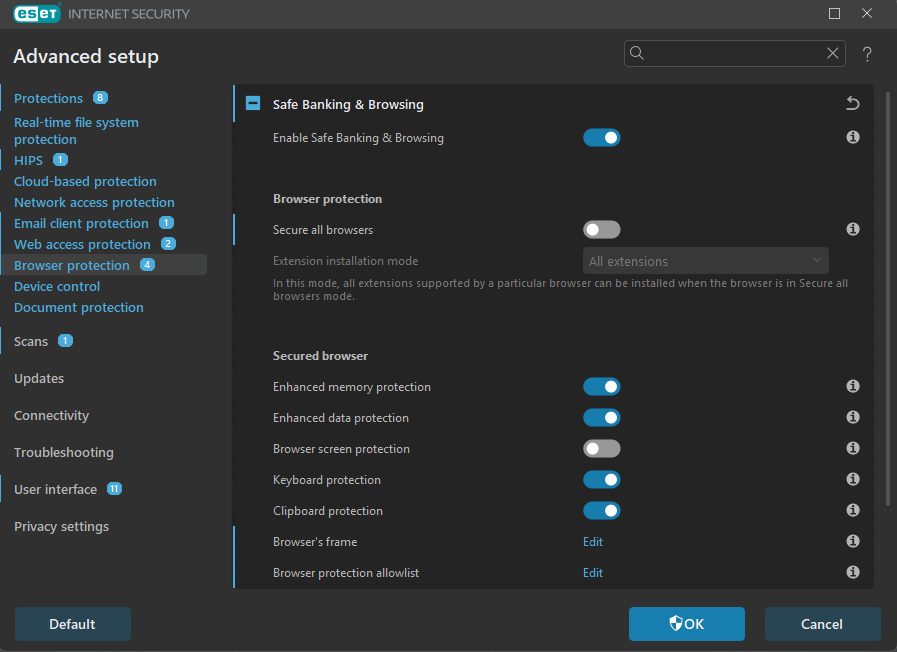
    In Advanced Setup (F5), go to Browser protection → Safe Banking & Browsing.
    Toggle Secure all browsers to Off.
    You can also Edit "browser protection allowlist" here.

Firefox Crash Reporter:

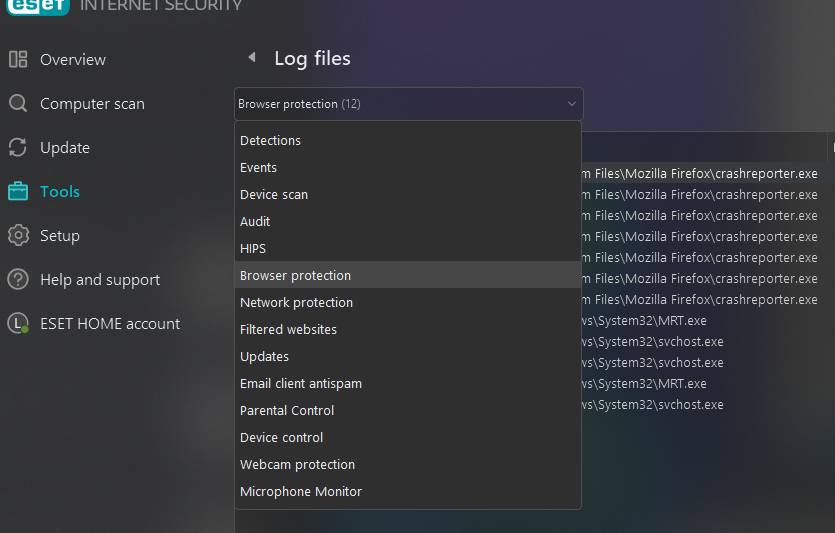
   Go to Tools → Log files → select Browser protection from the drop-down menu.
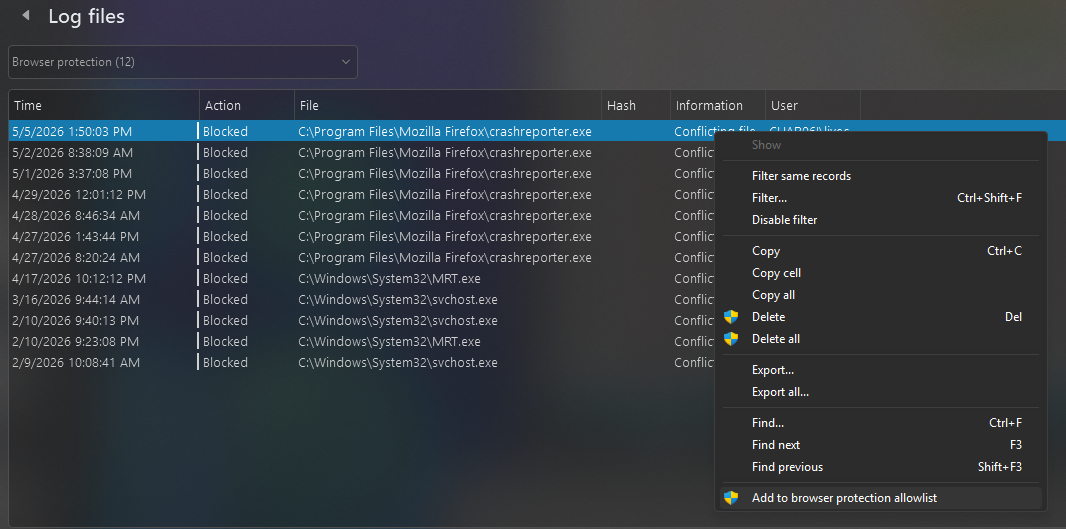
   Right-click the blocked entry for C:\Program Files\Mozilla Firefox\crashreporter.exe.
   Select Add to browser protection allowlist. This restores standard about:crashes logging.
Đọc câu trả lời này trong ngữ cảnh 👍 0

Tất cả các câu trả lời (1)

Giải pháp được chọn

This is what fixed PIP for me on 3 computers with ESET Internet Security. ESET 19.1.12.0 eOppBrowser.dll 1.0.169.0

Turn off "Secure all browsers":

    In Advanced Setup (F5), go to Browser protection → Safe Banking & Browsing.
    Toggle Secure all browsers to Off.
    You can also Edit "browser protection allowlist" here.

Firefox Crash Reporter:

   Go to Tools → Log files → select Browser protection from the drop-down menu.
   Right-click the blocked entry for C:\Program Files\Mozilla Firefox\crashreporter.exe.
   Select Add to browser protection allowlist. This restores standard about:crashes logging.
Đặt một câu hỏi

Bạn phải đăng nhập vào tài khoản của bạn để trả lời bài viết. Vui lòng bắt đầu một câu hỏi mới, nếu bạn chưa có tài khoản.