


Windows 10 reached EOS (end of support) on October 14, 2025. If you are on Windows 10, see this article.

Tìm kiếm hỗ trợ

Tránh các lừa đảo về hỗ trợ. Chúng tôi sẽ không bao giờ yêu cầu bạn gọi hoặc nhắn tin đến số điện thoại hoặc chia sẻ thông tin cá nhân. Vui lòng báo cáo hoạt động đáng ngờ bằng cách sử dụng tùy chọn "Báo cáo lạm dụng".

Tìm hiểu thêm

My Firefox profiles have disappeared and I cannot even open Firefox.

  • Không có trả lời
  • 1 gặp vấn đề này
  • 54 lượt xem
  • Open

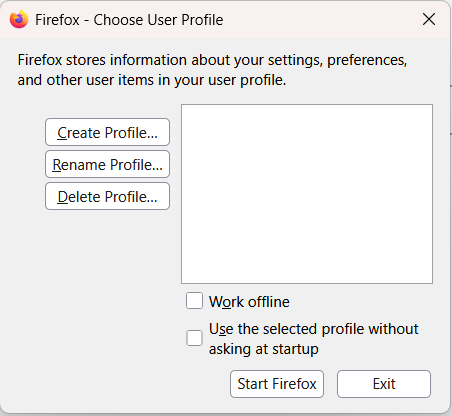
The last 2 days when I have shut down my computer then restarted, my Firefox profile has disappeared, along with all my bookmarks, passwords etc. I spent several hours yesterday following all the advice here to get everything back, but nothing worked. I had to create a new profile and then import an old passwords file, which I luckily had saved in Excel. This morning when I switched the computer on, the same thing has happened. I cannot even open Firefox without creating a new profile. I get a pop up box (screenshot attached), which shows no profiles, and i have to create a new one to even open Firefox. Every time I close out of Firefox and want to go back in, I am asked to choose a profile. This has never happened before.Before i give up forever on Firefox and go over to another browser, do you have any ideas how i can stop this from happening, and get my original profile, passwords, bookmarks etc back? Thanks.
The last 2 days when I have shut down my computer then restarted, my Firefox profile has disappeared, along with all my bookmarks, passwords etc. I spent several hours yesterday following all the advice here to get everything back, but nothing worked. I had to create a new profile and then import an old passwords file, which I luckily had saved in Excel. This morning when I switched the computer on, the same thing has happened. I cannot even open Firefox without creating a new profile. I get a pop up box (screenshot attached), which shows no profiles, and i have to create a new one to even open Firefox. Every time I close out of Firefox and want to go back in, I am asked to choose a profile. This has never happened before.Before i give up forever on Firefox and go over to another browser, do you have any ideas how i can stop this from happening, and get my original profile, passwords, bookmarks etc back? Thanks.
Đính kèm ảnh chụp màn hình

Bạn phải đăng nhập vào tài khoản của bạn để trả lời bài viết. Vui lòng bắt đầu một câu hỏi mới, nếu bạn chưa có tài khoản.