


Windows 10 reached EOS (end of support) on October 14, 2025. If you are on Windows 10, see this article.

Tìm kiếm hỗ trợ

Tránh các lừa đảo về hỗ trợ. Chúng tôi sẽ không bao giờ yêu cầu bạn gọi hoặc nhắn tin đến số điện thoại hoặc chia sẻ thông tin cá nhân. Vui lòng báo cáo hoạt động đáng ngờ bằng cách sử dụng tùy chọn "Báo cáo lạm dụng".

Tìm hiểu thêm

firefox running multiple instances in the background. How do i stop this?

  • 1 trả lời
  • 2 gặp vấn đề này
  • 62 lượt xem
  • Trả lời mới nhất được viết bởi Paul

When i start fire fox it immediately opens 10 additional versions in the background which I can see in task manager and they take up a lot off memory. If i end task them they immediately come back. This only started recently. I noticed it because now when i open say a youtube video it shows it as number 4. This never happened before unless I had the same video open more than once.

If I can not stop this I will have to uninstall.

When i start fire fox it immediately opens 10 additional versions in the background which I can see in task manager and they take up a lot off memory. If i end task them they immediately come back. This only started recently. I noticed it because now when i open say a youtube video it shows it as number 4. This never happened before unless I had the same video open more than once. If I can not stop this I will have to uninstall.
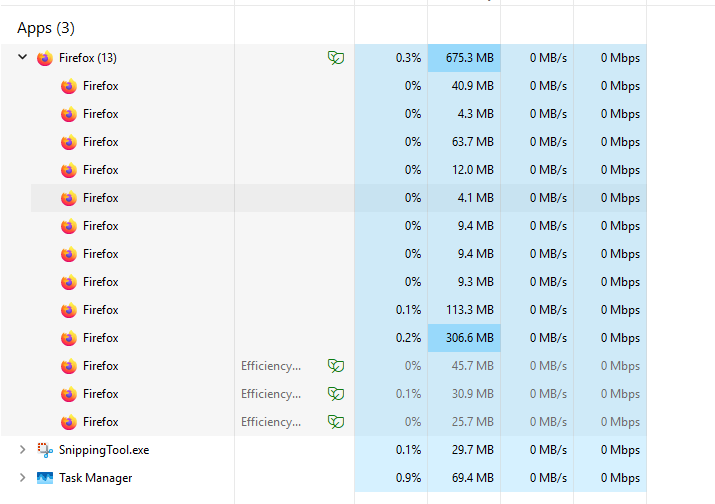
Đính kèm ảnh chụp màn hình

Tất cả các câu trả lời (1)

Hi

How many tabs do you have open in Firefox?

Have you installed a few add-ons?

Firefox utilises a multi-process architecture known as Electrolysis (e10s) for improved stability and performance. By default, e10s is enabled, meaning each web page opens in its separate process, isolated from the main browser process. This helps prevent crashes and improves responsiveness, especially when dealing with multiple tabs or resource-intensive websites.

Đặt một câu hỏi

Bạn phải đăng nhập vào tài khoản của bạn để trả lời bài viết. Vui lòng bắt đầu một câu hỏi mới, nếu bạn chưa có tài khoản.