


Windows 10 reached EOS (end of support) on October 14, 2025. If you are on Windows 10, see this article.

Tìm kiếm hỗ trợ

Tránh các lừa đảo về hỗ trợ. Chúng tôi sẽ không bao giờ yêu cầu bạn gọi hoặc nhắn tin đến số điện thoại hoặc chia sẻ thông tin cá nhân. Vui lòng báo cáo hoạt động đáng ngờ bằng cách sử dụng tùy chọn "Báo cáo lạm dụng".

Tìm hiểu thêm
Đã lưu trữ

How do I disable the "Suggest Firefox Relay email mask" option

Denys đã trả lời
cdmcclellan1

With reference to this question: https://support.mozilla.org/en-US/questions/1439281 from 2024

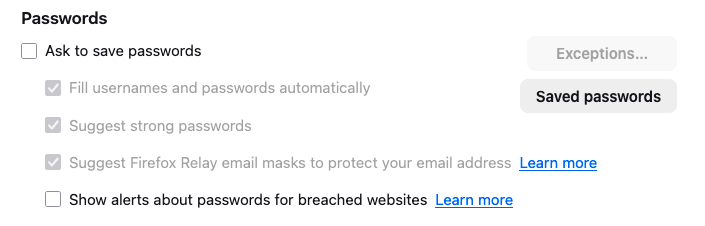
The answer was this: Disable "Suggest Firefox Relay email masks to protect your email address" in "Settings -> Privacy & Security -> Passwords".

But I already have this setting disabled. The popup still comes up. (BTW it's in "Preferences -> Privacy & Secutiry ->Passwords". The popup still comes up.

NO ONE IS WATCHING ME! I'm at home! (Except for that guy who sees what I do in bed /s)

Moderator note: This question has been edited to correct the link.
With reference to this question: https://support.mozilla.org/en-US/questions/1439281 from 2024 The answer was this: Disable "Suggest Firefox Relay email masks to protect your email address" in "Settings -> Privacy & Security -> Passwords". But I already have this setting disabled. The popup still comes up. (BTW it's in "'''''Preferences''''' -> Privacy & Secutiry ->Passwords". The popup still comes up. NO ONE IS WATCHING ME! I'm at home! (Except for that guy who sees what I do in bed /s) ''Moderator note: This question has been edited to correct the link.''
Đính kèm ảnh chụp màn hình

Được chỉnh sửa bởi Denys vào

Tất cả các câu trả lời (1)

Hi,

Not sure what may be the reason, but could you please check "Ask to save passwords", uncheck the Relay option (as it should become available) and then uncheck "Ask to save passwords" again? Does it help?