I see all my devices synced, but unable to acces to tabs

I have a profil i didn't use since 22 days because computer issues
I need to retrieve ALL my tabs from this device For some issues i could'nt to it all before.
Now, i can see in my firefox profil pge, the profil exist. But if i go to my firefox installed in my new computer, i don't see THIS firefox device with ALL my VERY IMPORTANT tabs.
Is there any way to retrieve them ?
firefox from linux mint 22.3
thx
Tất cả các câu trả lời (1)
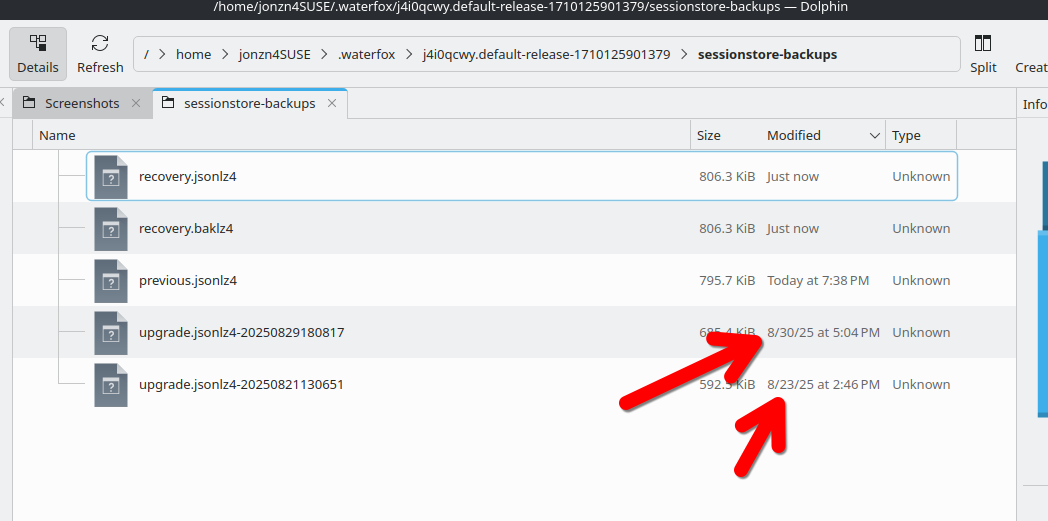
You can just copy the session file to your new computer. see my screenshot of example files and you can pick the date from your files you want to use. You will should have similar files in your profile folder(on both computers) in a folder name sessionstore-backups. On the old computer, with Firefox closed, copy and then move the session file you want to use to your new computer in the profile folder. Then rename it to sessionstore.jsonlz4. Either delete or overwrite the current file in the folder with the same name.
May the Schwartz be with you!!! ;-))