


Windows 10 reached EOS (end of support) on October 14, 2025. For more information, see this article.

Tìm kiếm hỗ trợ

Tránh các lừa đảo về hỗ trợ. Chúng tôi sẽ không bao giờ yêu cầu bạn gọi hoặc nhắn tin đến số điện thoại hoặc chia sẻ thông tin cá nhân. Vui lòng báo cáo hoạt động đáng ngờ bằng cách sử dụng tùy chọn "Báo cáo lạm dụng".

Tìm hiểu thêm

The "Payment Methods" section has disappeared.

  • 3 trả lời
  • 5 gặp vấn đề này
  • 75 lượt xem
  • Trả lời mới nhất được viết bởi Privato

tuỳ chọn khác

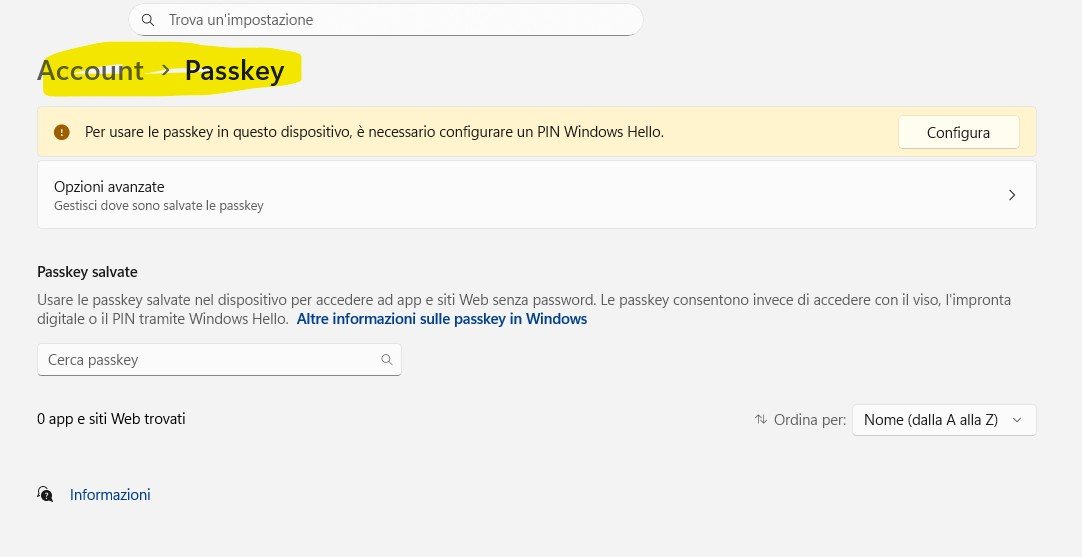
Good morning, the "Payment Methods" section has disappeared. In its place, I see a link called "Manage passkey in system settings," which takes me to the Windows 11 Passkey section, which I've NEVER enabled!

If I create a new profile, the "Payment Methods" section appears as normal, but when I link it to my Microsoft account for profile sync, the "Payment Methods" section disappears and "Manage passkey in system settings" reappears.

How can I fix this? Thanks
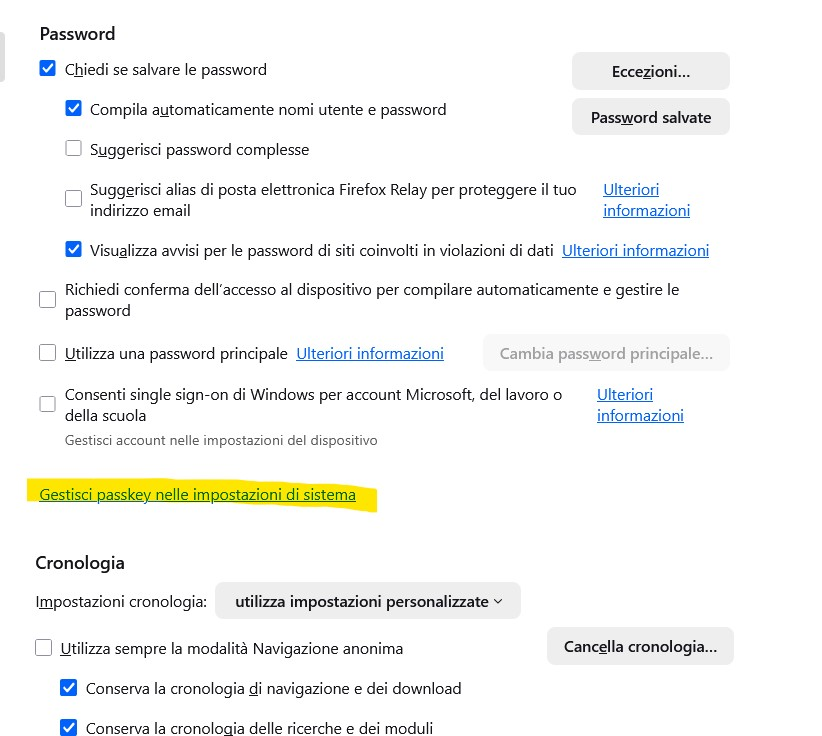
Good morning, the "Payment Methods" section has disappeared. In its place, I see a link called "Manage passkey in system settings," which takes me to the Windows 11 Passkey section, which I've NEVER enabled! If I create a new profile, the "Payment Methods" section appears as normal, but when I link it to my Microsoft account for profile sync, the "Payment Methods" section disappears and "Manage passkey in system settings" reappears. How can I fix this? Thanks
Đính kèm ảnh chụp màn hình

Giải pháp được chọn

This bug is still there in 146.0.1

Edit: I was able to fix this by adding my country code to the list in about:config to BOTH of these lines: extensions.formautofill.creditCards.supportedCountries extensions.formautofill.addresses.supportedCountries

Đọc câu trả lời này trong ngữ cảnh 👍 1

Tất cả các câu trả lời (3)

tuỳ chọn khác

With version 144.0.2, payment methods reappeared unchanged. At this point, I think it's a bug in Firefox version 145.0.2!

tuỳ chọn khác

Giải pháp được chọn

This bug is still there in 146.0.1

Edit: I was able to fix this by adding my country code to the list in about:config to BOTH of these lines: extensions.formautofill.creditCards.supportedCountries extensions.formautofill.addresses.supportedCountries

Được chỉnh sửa bởi DJ_SANYEE vào

tuỳ chọn khác

DJ_SANYEE said

This bug is still there in 146.0.1 Edit: I was able to fix this by adding my country code to the list in about:config to BOTH of these lines: extensions.formautofill.creditCards.supportedCountries extensions.formautofill.addresses.supportedCountries

Fantastic, thank you so much, you're truly a genius!!! You finally solved my problem!!! It works!!! THANK YOU!!!!

Đặt một câu hỏi

Bạn phải đăng nhập vào tài khoản của bạn để trả lời bài viết. Vui lòng bắt đầu một câu hỏi mới, nếu bạn chưa có tài khoản.