


Windows 10 reached EOS (end of support) on October 14, 2025. If you are on Windows 10, see this article.

Tìm kiếm hỗ trợ

Tránh các lừa đảo về hỗ trợ. Chúng tôi sẽ không bao giờ yêu cầu bạn gọi hoặc nhắn tin đến số điện thoại hoặc chia sẻ thông tin cá nhân. Vui lòng báo cáo hoạt động đáng ngờ bằng cách sử dụng tùy chọn "Báo cáo lạm dụng".

Tìm hiểu thêm

URL bar and open tas / bookmarks switched positions and I cannot change them back

  • Không có trả lời
  • 0 gặp vấn đề này
  • 28 lượt xem

Hello! I am running firefox and had an issue with the URL bar. Before, the URL bar was at the top and right underneath it would appear the open tabs; underneath that were my bookmarks. I don't know what I pressed, but now, the tabs and bookmarks are on top (on the same line), and the URL bar is underneath that -- see screenshot for details. It is a small issue, but it is driving me crazy, since all my mucle memory on where to click etc. is gone. Furthermore, the bookmarks now crowd the open tabs, so if I have a lot of open tabs, I cannot see them all at a glance.

I tried looking for settings, but all settings for customizing the toolbar are about adding items to the URL bar, not switching the position of URL bar and the open tabs. How do I fix this?
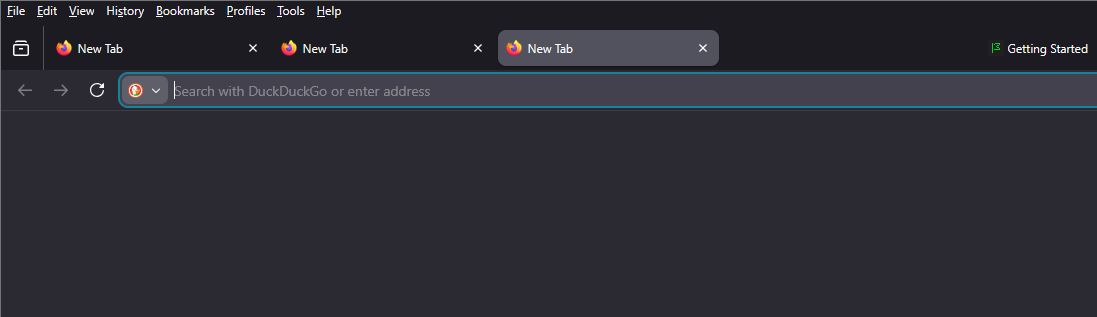
Hello! I am running firefox and had an issue with the URL bar. Before, the URL bar was at the top and right underneath it would appear the open tabs; underneath that were my bookmarks. I don't know what I pressed, but now, the tabs and bookmarks are on top (on the same line), and the URL bar is underneath that -- see screenshot for details. It is a small issue, but it is driving me crazy, since all my mucle memory on where to click etc. is gone. Furthermore, the bookmarks now crowd the open tabs, so if I have a lot of open tabs, I cannot see them all at a glance. I tried looking for settings, but all settings for customizing the toolbar are about adding items to the URL bar, not switching the position of URL bar and the open tabs. How do I fix this?
Đính kèm ảnh chụp màn hình

Bạn phải đăng nhập vào tài khoản của bạn để trả lời bài viết. Vui lòng bắt đầu một câu hỏi mới, nếu bạn chưa có tài khoản.