


Tout copier en temps que HAR not working

Hello,
In the DevToolbox, the “Copy all as HAR” and “Create file...” functions are not working. It seems that in both cases, only empty space is placed in the clipboard and in the file (this has been happening since the last update).
Thank you in advance.
Tất cả các câu trả lời (11)
Are you able to copy text/images from the page normally, the problem is only in the dev tools?
Hello Yes, I've tested everything and everything is working properly. It works for you. Ps: Please note, I may have mistranslated, but I am referring to the "web developer tools" because the "browser toolbox" work fine
Được chỉnh sửa bởi Zillab vào
Yes, I can see the problem on this page. After opening the Network Monitor (Ctrl+Shift+E) and reloading the page:
- right-click > Save As HAR seems to work (for a single request)
- right-click > Save All As HAR gives me a zero-byte file
- right-click > Copy value > Copy All As HAR puts "" on the clipboard
If I go to a simpler page (such as my pages at https://www.userchrome.org/ and https://www.jeffersonscher.com/photos/Maui07/index.php), it works fine. So it seems related to the request and/or response data.
In the Browser Console (Ctrl+Shift+J), I do see an error message related to Save All As HAR on this page:
TypeError: cyclic object value ... har-exporter.js:266:15
  stringify resource://devtools/client/netmonitor/src/har/har-exporter.js:264
  fetchHarData resource://devtools/client/netmonitor/src/har/har-exporter.js:215
  stringify resource://devtools/client/netmonitor/src/har/har-exporter.js:266
  fetchHarData resource://devtools/client/netmonitor/src/har/har-exporter.js:215
Line 264 uses the standard JSON.stringify() function, and Line 266 reports errors to the console:
https://searchfox.org/firefox-release/source/devtools/client/netmonitor/src/har/har-exporter.js#256
The error indicates that "object references were found in JSON" (Cyclic_object_value on MDN). So something may be wrong in the way Firefox is constructing the HAR object.
The usual way to discover the critical change would be to use the Mozregression tool. If you or someone else has time: https://mozilla.github.io/mozregression/
Được chỉnh sửa bởi jscher2000 - Support Volunteer vào
Thank you very much for your reply and information. Yes, these two web pages work for me too. But do you think this is a problem that Mozilla will resolve?
As a first step, I posted a link to this thread on the Discourse forum for the DevTools team. Hopefully someone there will be able to take this on.
https://discourse.mozilla.org/t/typeerror-cyclic-object-value-in-har-exporter-js/146385
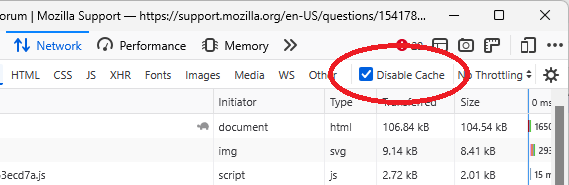
Based on subsequent discussion, this appears to be a problem with requests satisfied from the cache. If you do not need to test performance with caching, you can disable the cache when the dev tools are open using a checkbox in the Network Monitor:
Hello, Yes, it works. Thank you!
Ps: Just out of curiosity. On the page where I reported the bug, there is a link to the source of the js file that needs to be corrected... Does this mean that it will be done for the next Firefox update, or is it possible to apply these kinds of changes yourself in these internal files? Thank you in advance.
Được chỉnh sửa bởi Zillab vào
I looked at the related bug long enough to see that it might be related to cached files, but I didn't try to understand what would need to be changed. Typically, changes are tested in the Nightly and Developer Edition releases for two months before rolling out in the regular release, but critical fixes that don't affect a lot of other things often are rolled out more quickly.