


Windows 10 reached EOS (end of support) on October 14, 2025. If you are on Windows 10, see this article.

Tìm kiếm hỗ trợ

Tránh các lừa đảo về hỗ trợ. Chúng tôi sẽ không bao giờ yêu cầu bạn gọi hoặc nhắn tin đến số điện thoại hoặc chia sẻ thông tin cá nhân. Vui lòng báo cáo hoạt động đáng ngờ bằng cách sử dụng tùy chọn "Báo cáo lạm dụng".

Tìm hiểu thêm
Đã lưu trữ

Can not update location in weather (desktop, main page)

Keebler

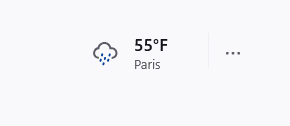
In the main page (new tab), upper right corner the weather is displayed. However, in my case it shows Paris, France. Been there! - but not in 40years.

the three dots beside the location open a search bar that does nothing. i enter my location... does nothing entered my zipcode... does nothing.

restarted my browser ..... no avail restarted my pc ... no avail

cleared cookies ... then restarted browser ... no avail


Windows 10 firefox ver: Version 143.0.1 (64-bit)


side note: this issue is also on my laptop w11
In the main page (new tab), upper right corner the weather is displayed. However, in my case it shows Paris, France. Been there! - but not in 40years. the three dots beside the location open a search bar that does nothing. i enter my location... does nothing entered my zipcode... does nothing. restarted my browser ..... no avail restarted my pc ... no avail cleared cookies ... then restarted browser ... no avail Windows 10 firefox ver: Version 143.0.1 (64-bit) side note: this issue is also on my laptop w11
Đính kèm ảnh chụp màn hình

Tất cả các câu trả lời (2)

Can you try to type the first 3-4 letters of the name of your town/city and wait a moment for the drop-down list?

Previously I was able to select my city, even my neighborhood, but now it looks like something strange is happening there.

This issue should be fixed now, try again.