


Windows 10 reached EOS (end of support) on October 14, 2025. For more information, see this article.

Tìm kiếm hỗ trợ

Tránh các lừa đảo về hỗ trợ. Chúng tôi sẽ không bao giờ yêu cầu bạn gọi hoặc nhắn tin đến số điện thoại hoặc chia sẻ thông tin cá nhân. Vui lòng báo cáo hoạt động đáng ngờ bằng cách sử dụng tùy chọn "Báo cáo lạm dụng".

Tìm hiểu thêm

How to disable click and hold context menu

  • 2 trả lời
  • 0 gặp vấn đề này
  • 78 lượt xem
  • Trả lời mới nhất được viết bởi timkalee

tuỳ chọn khác

There is a 'feature' in Firefox that I think is called "click and hold context menu". Basically if you left click on something and hold the click for a second or two a menu appears that offers an AI generated list of suggestions related to the thing you were clicking on. How do I disable this? In searching I have found suggestions to open about:config and set the value for ui.click_hold_context_menus to false, which I have done a few weeks ago now and it has no affect. I also tried changing the related value of ui.click_hold_context_menus.delay to an insanely long time, but that also had no effect.

I would appreciate some guidance on how to turn this off. This is problematic enough that I may have to switch to another browser if this can't be disabled. Thanks! Attached is a random example of one of these context menu's that appears when clicking and holding on a link.
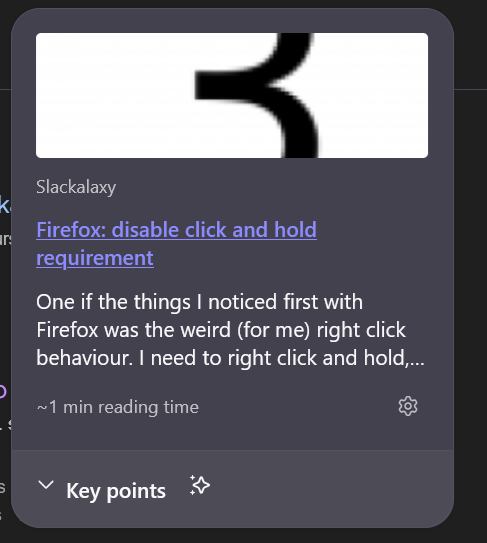
There is a 'feature' in Firefox that I think is called "click and hold context menu". Basically if you left click on something and hold the click for a second or two a menu appears that offers an AI generated list of suggestions related to the thing you were clicking on. How do I disable this? In searching I have found suggestions to open about:config and set the value for ui.click_hold_context_menus to false, which I have done a few weeks ago now and it has no affect. I also tried changing the related value of ui.click_hold_context_menus.delay to an insanely long time, but that also had no effect. I would appreciate some guidance on how to turn this off. This is problematic enough that I may have to switch to another browser if this can't be disabled. Thanks! Attached is a random example of one of these context menu's that appears when clicking and holding on a link.
Đính kèm ảnh chụp màn hình

Giải pháp được chọn

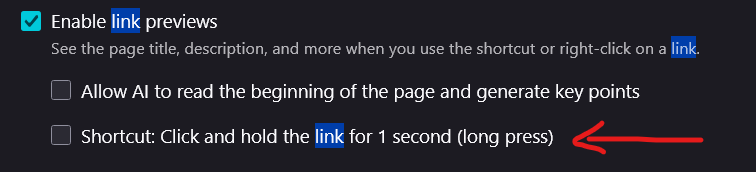
This is Link preview. Did you check the Settings? It's in the General panel.

Đọc câu trả lời này trong ngữ cảnh 👍 0

Tất cả các câu trả lời (2)

tuỳ chọn khác

Giải pháp được chọn

This is Link preview. Did you check the Settings? It's in the General panel.

tuỳ chọn khác

Ah, yes! That resolves the issue. Thank you. I was evidently searching for or just found the wrong thing. In the screen shot attached here, I point to the specific setting that I unchecked to resolve the issue. Thank you very much for pointing me to the right setting!
Đặt một câu hỏi

Bạn phải đăng nhập vào tài khoản của bạn để trả lời bài viết. Vui lòng bắt đầu một câu hỏi mới, nếu bạn chưa có tài khoản.