


Windows 10 reached EOS (end of support) on October 14, 2025. If you are on Windows 10, see this article.

Tìm kiếm hỗ trợ

Tránh các lừa đảo về hỗ trợ. Chúng tôi sẽ không bao giờ yêu cầu bạn gọi hoặc nhắn tin đến số điện thoại hoặc chia sẻ thông tin cá nhân. Vui lòng báo cáo hoạt động đáng ngờ bằng cách sử dụng tùy chọn "Báo cáo lạm dụng".

Tìm hiểu thêm

firefox maxing out ram while idle in the background

  • 1 trả lời
  • 6 gặp vấn đề này
  • 205 lượt xem
  • Trả lời mới nhất được viết bởi Gilligan
  • Đã giải quyết

Have been having an issue for the past month or two where if left in the background firefox will slowly start to eat up my available ram. I was using it like this perfectly fine for years previous to now.

I dont have this issue when I'm actively using it, only when I tab away from it and specifically its not on screen. Once I tab back to firefox the ram usage immediately dips back down to normal. I have tried many things to try and solve this like doing a clean install of firefox, getting rid of extensions, clearing my browser cache, closing all other apps to verify it was just firefox, clearing my history, turning on hardware acceleration. Nothing seems to help, im really at a loss and I don't understand what changed besides it being updated in the past couple of months.

My computer is fairly heavy duty and I have 16gb of ddr4 ram that again was working perfectly fine to run firefox before these past couple of months. As a result of this issue however if left in the background for too long on accident firefox uses up all my idle ram and starts causing other programs to not be able to run and has even crashed my computer previously when trying to run a program like clip studio paint.

I have noticed that while running the firefox task manager there is definitely some difference in memory usage when i tab back in after letting it be in the background so I have attached screenshots of the regular usage while tabbed in and the captured usage when i tab back in.

Any possible solution is welcome because I really enjoy using firefox and i dont want to have to switch browsers unless absolutely necessary.
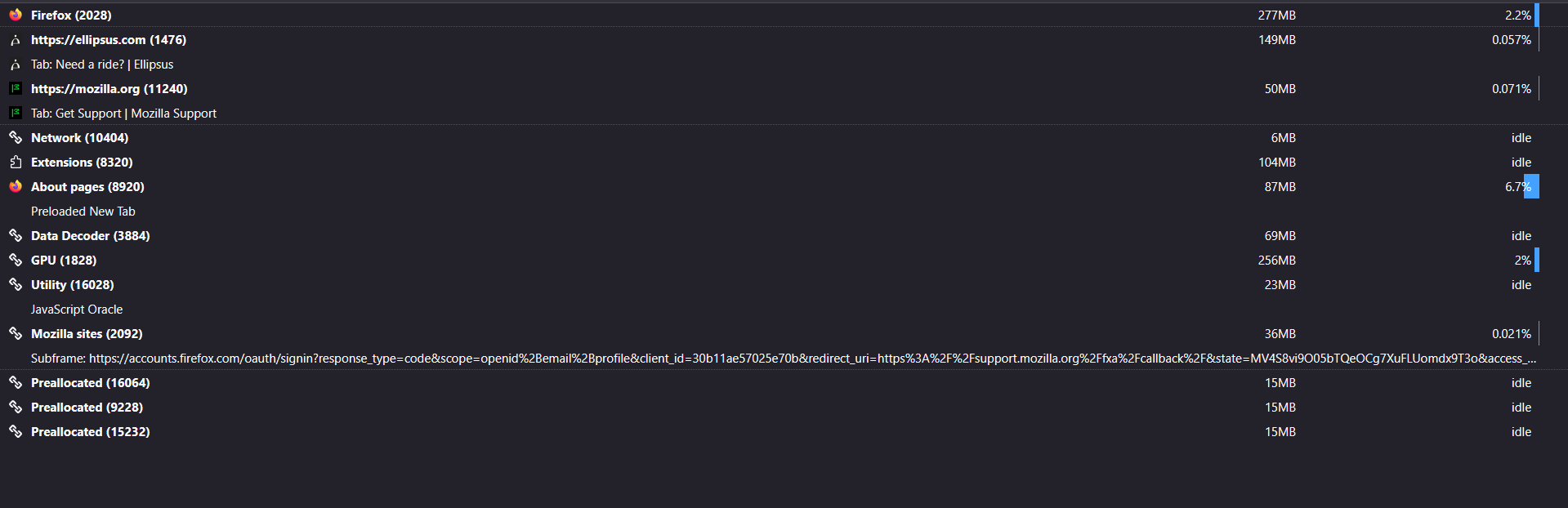
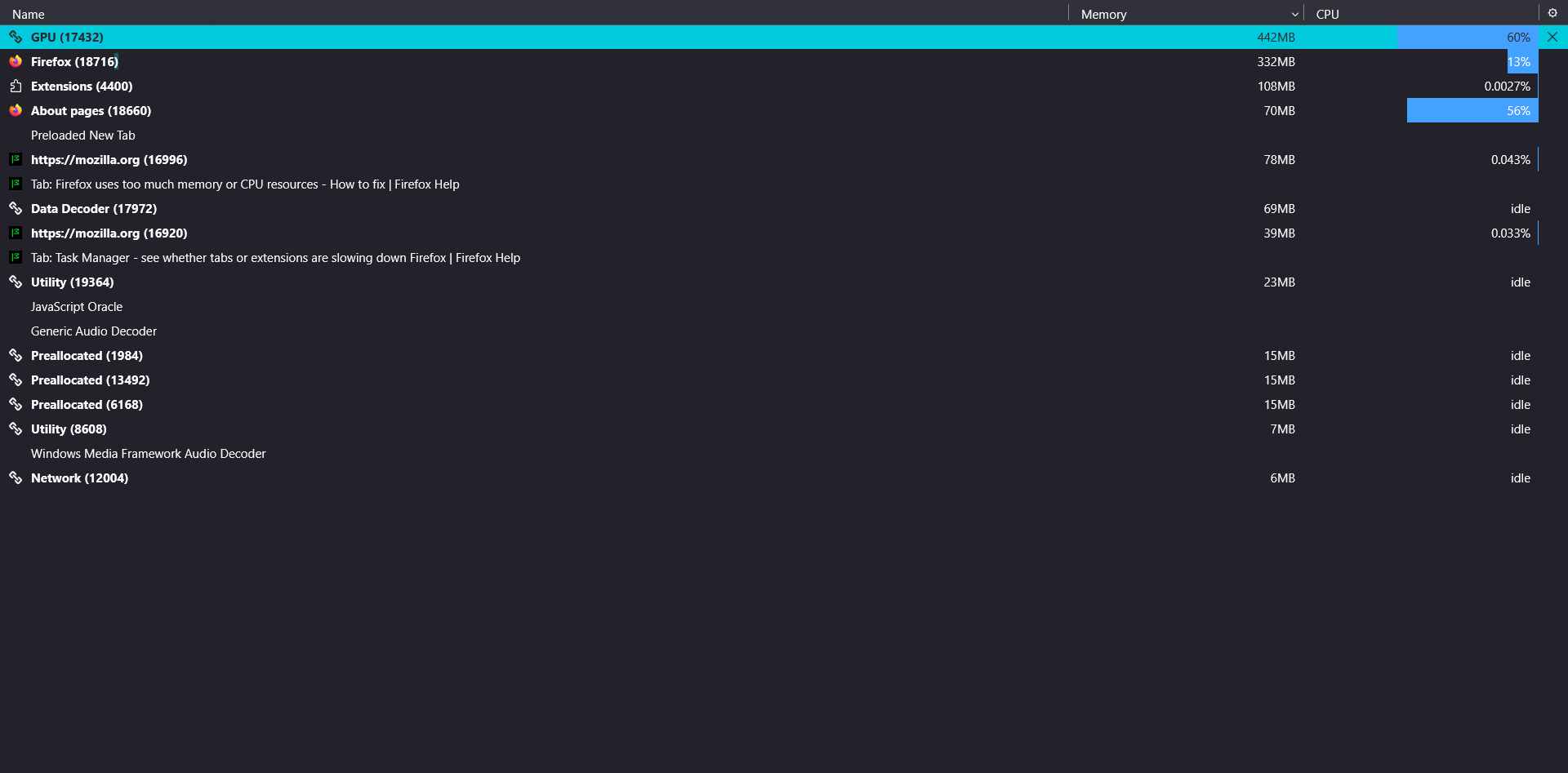
Have been having an issue for the past month or two where if left in the background firefox will slowly start to eat up my available ram. I was using it like this perfectly fine for years previous to now. I dont have this issue when I'm actively using it, only when I tab away from it and specifically its not on screen. Once I tab back to firefox the ram usage immediately dips back down to normal. I have tried many things to try and solve this like doing a clean install of firefox, getting rid of extensions, clearing my browser cache, closing all other apps to verify it was just firefox, clearing my history, turning on hardware acceleration. Nothing seems to help, im really at a loss and I don't understand what changed besides it being updated in the past couple of months. My computer is fairly heavy duty and I have 16gb of ddr4 ram that again was working perfectly fine to run firefox before these past couple of months. As a result of this issue however if left in the background for too long on accident firefox uses up all my idle ram and starts causing other programs to not be able to run and has even crashed my computer previously when trying to run a program like clip studio paint. I have noticed that while running the firefox task manager there is definitely some difference in memory usage when i tab back in after letting it be in the background so I have attached screenshots of the regular usage while tabbed in and the captured usage when i tab back in. Any possible solution is welcome because I really enjoy using firefox and i dont want to have to switch browsers unless absolutely necessary.
Đính kèm ảnh chụp màn hình

Giải pháp được chọn

Okay, OP of the post here again. I have figured out my problem.

After narrowing down any new features that came with the more recent updates to firefox I learned it was the new feature to add images as a background for new tabs causing the issues. It turns out that even though it allows you to use gifs as the background for new tabs this will apparently eat at your ram in the background if its not on screen. Even if its not even actively open or on screen.

I assume this has to do with gifs simply not being accounted for when this feature was added and causing some sort of bug? Really don't know but at least it narrows down the cause a bit. Just means for now I'll have to stick with a good old fashioned image as my new tab background instead for the foreseeable future.

Đọc câu trả lời này trong ngữ cảnh 👍 1

Tất cả các câu trả lời (1)

Giải pháp được chọn

Okay, OP of the post here again. I have figured out my problem.

After narrowing down any new features that came with the more recent updates to firefox I learned it was the new feature to add images as a background for new tabs causing the issues. It turns out that even though it allows you to use gifs as the background for new tabs this will apparently eat at your ram in the background if its not on screen. Even if its not even actively open or on screen.

I assume this has to do with gifs simply not being accounted for when this feature was added and causing some sort of bug? Really don't know but at least it narrows down the cause a bit. Just means for now I'll have to stick with a good old fashioned image as my new tab background instead for the foreseeable future.