


Windows 10 reached EOS (end of support) on October 14, 2025. If you are on Windows 10, see this article.

Tìm kiếm hỗ trợ

Tránh các lừa đảo về hỗ trợ. Chúng tôi sẽ không bao giờ yêu cầu bạn gọi hoặc nhắn tin đến số điện thoại hoặc chia sẻ thông tin cá nhân. Vui lòng báo cáo hoạt động đáng ngờ bằng cách sử dụng tùy chọn "Báo cáo lạm dụng".

Tìm hiểu thêm

Wrong favicon on Bookmark (Toolbar)

  • 1 trả lời
  • 0 gặp vấn đề này
  • 176 lượt xem
  • Trả lời mới nhất được viết bởi medsum
  • Đã lưu trữ

I visited the following site: Broker I can see their favicon in the tab. I bookmarked it to the Bookmark Toolbar, but the favicon is not the same (See image).

I did some search on this in google but nothing helped (refresh it, delete the favicon sql file, devtools chrome enabled, etc). I thought that firefox will honor the absolute path in the website. The following code is from the web site (I used the developer tools to inspect it).

<link id="dynamic-favicon" rel="shortcut icon" href="https://content.client.bnc.ca/content/dam/orion/favicon.ico">

If I edit that line to remove everything before the favicon.ico word, I get the incorrect icon.

This is not an issue in other browsers, but I only use Firefox at home.

How can I solve this? Hopefully without using an extension. Thanks
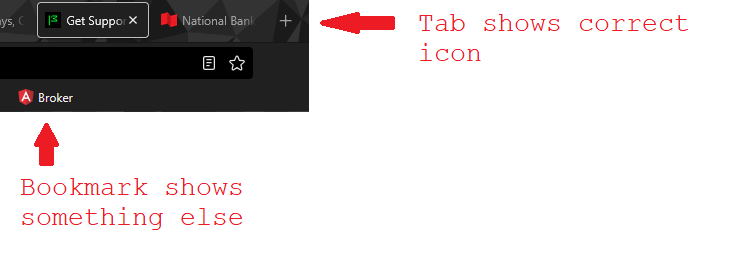
I visited the following site: [https://client.bnc.ca/nbdb/login Broker] I can see their favicon in the tab. I bookmarked it to the Bookmark Toolbar, but the favicon is not the same (See image). I did some search on this in google but nothing helped (refresh it, delete the favicon sql file, devtools chrome enabled, etc). I thought that firefox will honor the absolute path in the website. The following code is from the web site (I used the developer tools to inspect it). <link id="dynamic-favicon" rel="shortcut icon" href="https://content.client.bnc.ca/content/dam/orion/favicon.ico"> If I edit that line to remove everything before the favicon.ico word, I get the incorrect icon. This is not an issue in other browsers, but I only use Firefox at home. How can I solve this? Hopefully without using an extension. Thanks
Đính kèm ảnh chụp màn hình

Tất cả các câu trả lời (1)

Is there a way to bump this to firefox people? A few views but no solution yet.