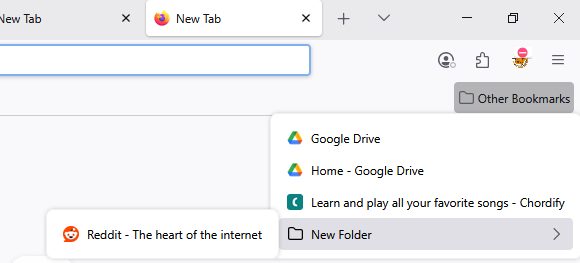
Is there a way I can middle click bookmarks in my "other bookmarks" panel and have them open in new tabs?
Recently switched from Chrome and in Chrome I would open my "Other Bookmarks" folder and middle click a bunch of bookmarks which would open them up in a new tab without switching to that tab or closing the "Other bookmarks" folder.
Is there a way I can replicate this on Firefox? Because at the moment, middle clicking the bookmarks does nothing. This is not about the bookmarks bar at the top.
Tất cả các câu trả lời (1)
Hi, you can do it in Firefox as well.
You'll have to bookmark a web page inside the Other Bookmarks section first. Only then the Other Bookmarks will appear in the top left of the browser. As you can see in the screenshot provided, I have three web pages and a folder inside the Other Bookmarks.
Once you have pages inside it, you can middle click it to open all the bookmarked pages in new tabs.